Solved X3U Pro Provisioning

Status
Not open for further replies.

Jim Taylor

Silver Partner
Basic Certified
Joined
May 16, 2018
Messages
39
Reaction score
5
We recently deployed Fanvil X3U Pro devices in 5 different locations, all behind SBC's. All phones show up in the Phones section as expected, I assign a phone to an extension, and it provisions just fine. However, the phone is now listed twice in the phones section: once still as a new device in bold letters, then a second time assigned to the extension with the IP address listed. I read another article in the forums that suggest to hit the Delete (X) next to the bold instance to remove the clutter for each provisioned phone, so I did that. The only problem now is, in the Phones section, if I make any changes to BLF or anything else for an extension and want to push the new changes, I have no way of pushing out the new provisioning; everything is grayed out when selecting that particular phone. It seems the only way to push out new changes would be to have the end user reboot their phone. Any suggestions?
Jim
 
Hi Jim,

Yes, the provisioning was not successful, this is why this has happened. This is indicated by the fact that the bold entries stayed visible, and the reprovisioning and reboot and firmware buttons remain disabled.

1. Confirm you have installed the correct firmware https://www.3cx.com/support/phone-firmwares/
2. Factory reset each device (this is mandatory).
3. Edit each extension individually, delete the entries for the phones and press OK to save.

You may now go to the phones section and assign the phones using the "Assign Ext" button.
Ensure that when you are taken to the extension provisioning tab, the correct model has been detected (ie. not a plain X3U)


I am assuming you are using V18 Update 3 with our built in templates - if you are not then you may very well face issues.

Let me know how it goes!
 
Ouch. I have to manually touch 50+ phones now. No alternative? All the phones are on 2.4.7.4. The most recent version on the link you sent is 2.4.7.5. Was there that much of a difference between the two firmware versions?
 
I actually just uploaded the firmware to one of the phones as a test and it took it, rebooted, and now the provisioning looks ok. I didn't have to factory wipe it.
 
Hi Jim,

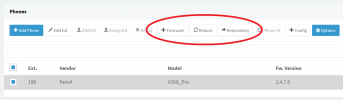
1. For the phone you just updated, if you select it on the "Phones" page, do the circled buttons now activate?
1655361559467.png

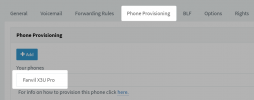
2. Under its extension, is it defined specifically as a X3U Pro?
1655361630454.png
 
Yes, and yes. Looks good across the board.
 
  • Like
Reactions: JohnS_3CX
Ok you should be perfectly fine then, and I think the reason you were facing these issues was because you were on the wrong firmware.

The old firmware was not supported by 3CX, it has a different user agent and hence will not match with what 3CX expects which breaks functionality and results in exactly the problems you described originally.

If you upgrade the firmware on all the devices, they should become fully supported.
There is a small risk that some phones may misbehave due to stored values that carried over from the old firmware, but in case that happens you can quickly fix it by simply factory resetting and reprovisioning your phones.
 
Status
Not open for further replies.

Latest Posts

Members Online Now

Forum statistics

Threads
111,817
Messages
589,158
Members
164,635
Latest member
ok.cmptr