X5U-V2 Disable Screensaver via template

Status
Not open for further replies.

r.rautenstrauch

Customer
Joined
Jul 28, 2023
Messages
6
Reaction score
1
Has anyone managed to disable the screensaver on these phones via the provisioning template? My user base does not like the screensaver (personally I don't either). Fanvil has an item in their XML config file for it. I have tried adding it to my custom template and it does not seem to push through to the phone. Anyone else try this?
 
As best I have been able to tell, it's not in the template. I recently sent them a feature request to add a few things to the template. The phone webUI *does* have the option to turn it off, and as best I can tell, until you push a provision from 3cx (and maybe even after), it doesn't overwrite it. But we should check that.
 
Thank you @slightlyevolved. I can confirm that it is not in the template (only backlight) and the setting never gets overwritten by 3CX. I made the change on my phone (turning off screensaver) and have re-provisioned a number of times as I make template changes. My screensaver remains off to this day. Hopefully they will incorporate your feature requests. I'm getting tired of turning it off individually. I did receive copies of the XML templates and specs from Fanvil support, but that obviously doesn't help with 3CX ;-)
 
  • Like
Reactions: slightlyevolved
Well, at least we now know we don't have to redo the settings everytime it provisions the phone. I can live with that.
 
Well, at least we now know we don't have to redo the settings everytime it provisions the phone. I can live with that.
Glad you can ;-). However, I am not running around manually changing hundreds of phones.
 
Yaaaaas. The initial hit would suck hard. After that, doing one or two at a time isn't so bad. I caught it at the first 10. Lucked out there. Still is quite annoying. One of the other requests I made was for the IP address that shows in the phone list to be a clickable URL. Not having to lookup an IP, open another tab, type the IP, enter the login... over, and over, and over. Talk about your quality of life improvements.
 
Doesn't the "Phone UI" link work for you under the list of phones? That's what I use for 1-click login to the phone admin website.
 
From Management Console: Phones->Phone Provisioning scroll down to Screensaver Timeout and Backlight timeout Shouldn't need to go into UI on phone
 
Doesn't the "Phone UI" link work for you under the list of phones? That's what I use for 1-click login to the phone admin website.

From Management Console: Phones->Phone Provisioning scroll down to Screensaver Timeout and Backlight timeout Shouldn't need to go into UI on phone
We don't have a phone UI link. Probably because we're on Hosted Professional.

And that's what the issue is, while there *IS* a backlight setting in 3cx there, it does NOT have most of the settings the phone is capable of, including an always on option. Also, no screensaver settings at all, just backlight.
 
  • Like
Reactions: r.rautenstrauch
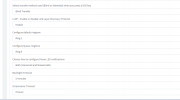
This is what it looks like in the regular 3CX management Console (I am self hosted)Screenshot1.png
 
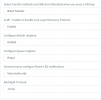
This is ours, however, we have V1 phones and some X6Us, so there might be some differences there.Screenshot 2023-08-01 at 4.17.38 PM.png
 
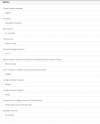
@BK63 I am self hosted and I do not have a screensaver option. My install is running the most recent release of V18 also. Which model phones are you using? 1691086421876.png
 
Ok, that explains that issue. You're using different phones. We are talking about the Fanvil series here. I have used Yealink in the past. Good phones.
 
Status
Not open for further replies.

Members Online Now

No members online now.

Forum statistics

Threads
111,835
Messages
589,289
Members
164,665
Latest member
dominik.pepel