xxx.az.3cx.us DNS is offline

Status
Not open for further replies.

Bob Denny

SOHO User
Joined
Feb 21, 2009
Messages
195
Reaction score
17
The xxx.az.3cx.us DNS no longer translates to our IP. So to check the health of the switch I replaced that domain with the public IP address of the switch in our ATA boxes and Bria softphones. Now our extensions are again registered. We can receive incoming calls from the outside. However we cannot place calls from any of our extensions because the IP in the call does not match the FQDN.

04/08/2019 6:21:27 PM - [CM503013]: Call(C:279): Incoming call rejected, caller is unknown; msg=Invite-IN Recv Req INVITE from nnn.nnn.nnn.nnn:5062 tid=-f127653a [email protected]: INVITE sip:[email protected] SIP/2.0

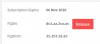
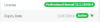
I can get to the management console via the IP address (with https not working of course) and it seems fine. It shows us paid through 11/2019:
10164

What happened??? Why did the DNS suddenly stop for our domain name? This "just happened" without us doing anything.
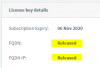
 
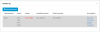
Could this be it? I never released my IP or FQDN!!! Also note the recent renewal through 2020, though it is showing nov 2019 on my switch. Something got screwed up. I got a meswsage about auto-renewal being canceled, so I renewed manually. This looks like a customer service issue. HELP!!

10168
 
for the simplest test, can you restart the service "3CX System Service" give it 10m and check in the customer portal if the FQDN is "re-linked"?
 
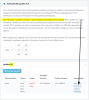
I'm a bit confused. The Automatically Update 3CX page lists 1 update to 15.5 SP5 BETA (see image below). 15.5 SP6 (presumably a release?) is not listed. Furthermore it says that RELEASE updates are automatically installed, and as far as I know that has been happening here. I am pretty careful and would not normally install a beta. My needs are very basic.

Also, our FQDN is in constant use, as we have multiple softphones and ATAs that re-register every 600 sec, and the SIP server is configured to use the FQDN not the IP since the IP is dynamic. So the idea that we haven't used the FQDN for 60 days (in the article you pointed to) is unlikely to be the cause here. We don't need a custom FQDN, the one you assigned is just peachy.

This switch has been running ion this configuration for several years, and we (honestly!!) haven't changed a thing. It just quit a few days ago all on its own.

Do I need to manually install the 15.5 SP5 BETA in order for the 15.5 SP^ to be listed as an update?

10184
 
OOPS! I see this note you pointed me to now https://www.3cx.com/blog/news/pbx-upgrade-update-6/ and I see that the move to 15.6 maybe did NOT happen automatically. I will follow through now and report back. I'm still trying to see how to restart the service (I'm on Google Cloud). Maybe in the Google controls not the via the 3CX Dashboard etc....

I know nothing about Linux, this was one of your "express" cloud installs with me coming from WIndows and to Google Cloud Services. I'm hoping I can get the privileges.
 
Let us know how it goes... :)

By the way, from the Linux Terminal, you can stop all 3CX services using this command:
Code:
sudo 3CXStopServices

Then start then again using this one:
Code:
sudo 3CXStartServices
 
Thank you for the fast response. It looks scary but off I go!!
 
Don't worry, best advice ever though is this:
Have a backup which you have downloaded locally, this way regardless what happens, you can re-create everything.
 
Attached is the SSH Terminal Log from following the instructions as best as I could. I had to learn what sudo does :-) Anyway, the switch apparently did not get updated. As you can see there were numerous warnings. I just did it because I thing Linux is a mine field and who knows what stuff is installed. It didn't seem to prevent the switch form restarting.

10191
 

Attachments

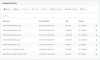
PS I take weekly scheduled backups to my Google Drive, but I noticed it left four files? I have never needed to restore so I guess I can figure this out.

On my Google Drive:
10192

On the 3CX Console:
10193
 
PS I was in the ~ folder when I ran that stuff. Maybe I should have started in / and changed to root? How do I do that (sudo is a 1-liner)?

Edit: I see... 'su' to get "permanent" root. I await your analysis though rather than possibly doing more damage.
 
Oh Wait!! I just checked and the FQDN and IP are back! What the hell? I still want to update the switch though so this doesn't happen again. I suspect that restarting it refreshed the FQDN/IP. I don't want to have to do this periodically (when our phones quit) so I want to complete the upgrade successfully.

10194
 
Last edited:
I just noticed this in my email. What does it mean? Again until a few days ago this phone service has worked perfectly for a couple of years. I have my license key and Certificate of Ownership. This is getting quite confusing.
 
Last edited by a moderator:
OK, so there a few things here. First I checked your key and it should be fine, so don't worry about the email (FYI, removed the image as it contain sensitive info).

Moving on, I think that something has locked apt, so I think the first thing you should do is reboot your 3CX Server, from the terminal you can do this with:
Code:
sudo reboot

Once the instance comes back up, it would be good to fix a small issue with a Google repo. Just use this command:
Code:
sudo curl https://packages.cloud.google.com/apt/doc/apt-key.gpg | sudo apt-key add -

After this, run the following commands to see what versions you can see:
Code:
sudo apt update
sudo apt-cache policy 3cxpbx

Don't try upgrading just yet because I believe you are running on Debian 8, and going to 3CX V16 isn't recommended. First you would need to go to Debian 9, then go to V16. To upgrade to Debian 9, you can check this forum thread out: https://www.3cx.com/community/threads/debian-upgrade-8-to-9.64634/#post-274884

One thing at a time though, lets see what 3CX versions you can see and will take it from there.
 
Last edited:
Failed, however I overcame this one:

3cx> sudo curl https://packages.cloud.google.com/apt/doc/apt-key.gpg | apt-key add -
% Total % Received % Xferd Average Speed Time Time Time Current
Dload Upload Total Spent Left Speed
100 1326 100 1326 0 0 49844 0 --:--:-- --:--:-- --:--:-- 51000

ERROR: This command can only be used by root.
3cx> sudo curl https://packages.cloud.google.com/apt/doc/apt-key.gpg | sudo apt-key add -
% Total % Received % Xferd Average Speed Time Time Time Current
Dload Upload Total Spent Left Speed
100 1326 100 1326 0 0 8043 0 --:--:-- --:--:-- --:--:-- 8085
OK
3cx>


and I did the rest. Looked much better. The log of that session is attached.
 

Attachments

Good catch on the missing "sudo"! Generally, if you want to avoid having to write that all the time, you can type "sudo su" and enter root mode, so all commands are ran as if you used sudo.

OK, so use the following command to open the sources file of 3CX:
Code:
nano /etc/apt/sources.list.d/3cxpbx.list

This should contain only the following line:
Code:
deb http://downloads-global.3cx.com/downloads/debian jessie main
Note the above is because you are still on Debian 8. If there is anything else, remove it and replace with the above

If it was Debian 9 it would be this:
Code:
deb http://downloads-global.3cx.com/downloads/debian stretch main

To save, press Ctrl + X, then 'Y' and Enter.

After this, run:
Code:
apt update
apt-cache policy 3cxpbx
and you should see something like this:
10208


If you see 15.5.15502.6 at the top of the list, then just do:
Code:
apt upgrade -y
and all new packages should be installed, including 3CX V15.5 SP6
 
The upgrade has been stuck at 90% for an hour. We have no phone service now. Here are my changes and a log of the activities (attached) up to now, and it's still running...:

10210
changed to
10211

I used sudo su to get into root in order to (a) make the above change, and (b) run apt-upgrade. See the attached log (it's still running, we have no phones now, and I cannot log into the dashboard)
 

Attachments

I tried hitting enter a couple of times in case it was waiting for input. Still stuck.
 
Status
Not open for further replies.

Latest Posts

Forum statistics

Threads
112,089
Messages
590,698
Members
165,060
Latest member
ggoutis