xxx.az.3cx.us DNS is offline

Status
Not open for further replies.

Bob Denny

SOHO User
Joined
Feb 21, 2009
Messages
195
Reaction score
17
The xxx.az.3cx.us DNS no longer translates to our IP. So to check the health of the switch I replaced that domain with the public IP address of the switch in our ATA boxes and Bria softphones. Now our extensions are again registered. We can receive incoming calls from the outside. However we cannot place calls from any of our extensions because the IP in the call does not match the FQDN.

04/08/2019 6:21:27 PM - [CM503013]: Call(C:279): Incoming call rejected, caller is unknown; msg=Invite-IN Recv Req INVITE from nnn.nnn.nnn.nnn:5062 tid=-f127653a [email protected]: INVITE sip:[email protected] SIP/2.0

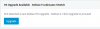
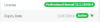
I can get to the management console via the IP address (with https not working of course) and it seems fine. It shows us paid through 11/2019:
10164

What happened??? Why did the DNS suddenly stop for our domain name? This "just happened" without us doing anything.
 
Stuck for a few hours. I don't think it's going to complete. I hesitate to kill it mid stream and re-run apt upgrade -y again. I guess you are west of GMT and are not working for the rest of our day. I'll wait to avoid damage.
 
It might be a good time to download the latest 3CX Linux ISO and reinstall as long as you have a good solid recent backup, the one without a number after it should be the newest. When the Debian 8 to 9 update came around we just built a template and re-installed them all, it was easier than hunting dependancy issues, and most of ours are hosted in vmware vcenter, so spinning up a template copy and dropping in the backup takes us all of 10-15 minutes, sometimes quicker.
 
Thanks Brentt -- If I only knew where to even start. Plus I need to go to Debian 9 and wouldn't know how to start. I am not a Linux sysadmin or even a somewhat functional user. This is on Google Cloud and I took the dummy's install option where I really never saw Linux and just directly logged into the dashboard. I do have a backup but I don't know how to use it for anything (yet). Dang, our phones were working OK until this last apt upgrade.
 
We had debian 8 upgrades go sour as well, which is why we did it the way we did based on standard build images.
 
OK, I'm going to kill this and start over. It should be an interesting exercise in "just in time learning". Thanks for the encouragement. I have the backup from 4/7 Sunday night which should be totally up to date for settings and extensions.
 
killed it , then tried to start the switch. On logging in the dashboard continuously refreshes itself and I was the CPU climb to 100% then back down. Interesting. Obviously broken somehow. Then I tried the upgrade again and got

sudo apt upgrade -y
E: dpkg was interrupted, you must manually run 'sudo dpkg --configure -a' to correct the problem.


I ran the dpkg command and it again printed the license agreement and it's back to being stuck again. Oh well I thought I'd try.
 
Guess what? I rebooted and now the Dashboard and the switch is running again! I guess the upgrade mostly worked. I'm going to do a backup now (saving the ones I already have) and then take the offered one-button Debian 9 upgrade.
 
If you can pop up a new VM in the google cloud with the newest 3CX iso mounted to it, the install is very easy, and after its installed, it will ask you would you like to install from browser or command line, and you answer browser, and then you will be able to open it in the browser and upload the zip via a nice friendly web page, after which the restore process is a next, next, next style wizard.
 
Ah, this is excellent. Let me research how to do this. It sounds like a good way to start from scratch and have a clean system This was a real mess if you read my command line/SSH terminal logs ha ha.

THANK YOU!!!
 
I just took the Dashboard Debian 9 upgrade. Supposedly it will reinstall 3cx thereafter, with my data in place. We shall see... Again thanks for the input. Every little piece of info makes the puzzle a bit clearer. Sort of like Wheel of Fortune.
 
If you do the fresh install with intent to restore your backup, just make sure to follow the questions it asks carefully, dont rush, in fact take it slow, as some parts of the process you cannot go backwards if you make a mistake.
 
I took the Debian upgrade:

10221
Apart from a new backup (in addition to the one I just did) named backup_3cx_2019_04_10_15_20.zip being created by the Debian Upgrade, nothing else happened. 30 minutes later and

3cx> lsb_release -a
No LSB modules are available.
Distributor ID: Debian
Description: Debian GNU/Linux 8.11 (jessie)
Release: 8.11
Codename: jessie


I started 3CX and its running again. Enough for today! I ran 3CX on Windows for 5 years and it was totally painless. #ilovelinux
 
The Debian 8 build was young in 3CXs linux development, the Debian 9 build and associated scripts are much more refined, and reliable, as Debian 9 itself is as well. We have 70 of them running on our cloud on debian 9, and 7 windows 3cx servers, the windows 3cx servers need periodic reboots otherwise little audio quirks and things start to happen, memory usage gets heavy, etc. The debian 9 ones run forever with pretty much no maintenance, and doing their own updates as we have auto update turned on for them. They also use far less CPU and RAM, while maintaining better capacity, and being much more responsive both in call operations, and the managment console.

We manage literally thousands of phones throughout our 3CX deployments, and Debian 9 is our hands down go to for easy installs, simple management, and rock solid reliability.
 
Thanks again. Sorry for the mini-rant :-) It's going to be after hours so I'm going to try the Dashboard Debian 9 again. What the heck? The switch has indeed been upgraded to 15.5 SP6 now even though it seemed to stop at 90%. We'll see.
 
Most likely you will continue to see it get stuck there no matter how many times you try, thats what happenned to our Debian 8s, its some kind of underlying dependency issue that their auto update script doesnt have a handle for. Ours would start to update and then just go out to lunch forever.

Im a linux engineer and after 20-30 mins of trying without luck to sort out the deps manually, i just built a new image for mass deployment, it was easier in my case.
 
OK I get it. If this doesn't work I'll take your advice. I'm no Linux engineer and I know next to nothing about the Google Cloud VM environment so it will take me much longer ha ha ha.
 
Well it failed to upgrade to Debian 9 again, and is running again on Debian 8. And I have no idea why, the process is blind. This time for sure I'm quitting for the day, and probably till the weekend. At least the phones are operational. Thank you again for the advice Brentt. I do appreciate it.
 
Of course, If its back up thats what matters. And now you have a plan forwards for later.

Your welcome!
 
OK, @NickD_3CX in case you check in here while I'm asleep, the switch is running and is updated to 15.5 SP6, with all new updates applied (trunks and ISO cert) except Debian 9. I have a fresh backup (in addition to the minimal one made by the upgrade process). Here is the log from the failed Debian 9 Upgrade (attached). As you can see @BrenttG suggested I just nuke the whole thing and start from scratch. Not knowing what the hell I am doing this seems like a large "just in time learning" task. I'll do it if needed though. Can you maybe tell me why your Debian 9 script is dying?
 

Attachments

Last edited:
Hey Bob!

Yes, I just got up to date with this. So, the good news is that now that you are V15.5 SP6, the FQDN seems to be back to normal, which was the initial problem you reported.

The Debian 8to9 script seems to be failing due to a problem with yet another one of the repositories. You can see this in with the following log lines you sent over:
Code:
W: Failed to fetch http://deb.debian.org/debian/dists/jessie-updates/InRelease  Unable to find expected entry 'main/source/Sources' in Release file (Wrong sources.list entry or malformed file)

W: Failed to fetch http://deb.debian.org/debian/dists/jessie-backports/main/source/Sources  404  Not Found

W: Failed to fetch http://deb.debian.org/debian/dists/jessie-backports/main/binary-amd64/Packages  404  Not Found

E: Some index files failed to download. They have been ignored, or old ones used instead.

Now as @BrenttG said, you can try and fix these, then repeat the process. This is a bit of a process, even for more experienced Linux users. If I had to guess, the issue is in file /etc/apt/sources.list
Also I think the problem is related to this: https://unix.stackexchange.com/questions/508724/failed-to-fetch-jessie-backports-repository
So, you can have a go a doing this.

OR

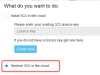
You could take @BrenttG, which I agree would be the easiest, take a fresh full backup, download it, scrap the old instance and create a new one. For creating the new one, you could you PBX Express again and use the "Restore" option to restore the backup you have:
10228
There are instruction on how to do this, but it includes uploading your backup to a Dropbox or GDrive account temporarily.


So, what it comes down to in my eyes, do you want to use this as a chance to "get your hands dirty" with Linux and come out of it having learnt a few extra things? Or do you just want to get the system up and running again asap?
 
Status
Not open for further replies.

Latest Posts

Forum statistics

Threads
112,089
Messages
590,698
Members
165,059
Latest member
David2026