Solved Yealink Company Phonebook V20 not working

Status
Not open for further replies.

bigdessert

Silver Partner
Advanced Certified
Joined
Apr 3, 2017
Messages
90
Reaction score
31
3CX V20 Update 7. Remote phonebook not showing any entries. No errors, we know it's not SSL related as we hosted the phonebook on a non HTTPS site and added it to the phone configuration manually and still will not load it. Phones are T58W or T54W same issue on either, interestingly an old T46G updates and shows just fine. 3CX is not in multi company. Anyone else seeing this? Might need to post something on Yealink boards as maybe a bug in firmware.
 
Hi,

Edit a BLF on the 3CX extension and see if the phone will reprovision successfully. That's how you'd rule out SSL in this case.

- Is this the default 3CX phonebook or something custom?
- Are you using custom templates or the 3CX default?
- Are you using the supported firmware 3CX provided?
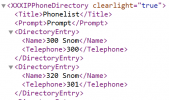
- If you open the yealink_phonebook.xml 3CX generates, in a browser, do you see entries in it like so?
1761811316832.png

PS: I have already added a fresh T54W and T58W to a V20U7 with a 3CX FQDN and certs, and both show the phonebook successfully.
 
Editing BLF updates on the phone so not SSL issue.

- Is this the default 3CX phonebook or something custom? Default 3CX Phonebook
- Are you using custom templates or the 3CX default? No Custom Template
- Are you using the supported firmware 3CX provided? Firmware is latest supported on 3CX.
- If you open the yealink_phonebook.xml 3CX generates, in a browser, do you see entries in it like so? Yes, I see those entries and it updates when I add/remove entries.
 
Hello,

So after checking the one we discussed, it looks like the phones can pull the remote directory just fine.

In this case you still don't see it so you might want to open a ticket with Yealink Support so they can investigate.

But make sure you try with a factory reset phone first to ensure no previous settings/data was left behind.
 
Thank you for your time, yes it appears it must just be something with my specific configuration of the phone as the XML worked just fine on your end.
 
Hello bigdessert,

The IP phones can only display one number, that is the gsm number from the phonebook.
Just a question...
Do you have at least one name in the phonebook, whith a number in the 'Mobile' field?

Paulo
 
Factory reset on my T58W fixed the issue. Not sure what was configured on the phone that was causing the issue, but factory reset fixed it.
 
Status
Not open for further replies.

Members Online Now

Forum statistics

Threads
111,831
Messages
589,277
Members
164,660
Latest member
RJenkinsROCK