Solved Yealink Internal / external call tones sound the same

Status
Not open for further replies.

Dunblue

Bronze Partner
Advanced Certified
Joined
Sep 22, 2020
Messages
44
Reaction score
3
As of approximately one week ago, the ringtones for both internal and external calls are the same on our Yealink devices (a mix of T46U and T41P's). The ringtone is what was previously only used for internal calls.

No settings have been changed relating to ringtones on either the 3CX system or the devices themselves.

When I came on the forum and saw this recent thread I thought it was somebody else having the same issue but alas not. However one thing worth noting from that thread is this reply from 3CX staff:

IVR calls, Internal calls, and Ring Group calls = Use same Ringtone (Change it under "Configure default ringtone")
Queue Calls = Can have a distinct ringtone (Change it under "Configure Queue ringtone")
Queue Calls (Per queue) = Can be assigned a different ringtone per specific queue (Go to Phones > Options and select "Use custom ringtones per queue" before editing your extensions)
External calls = They have a hardcoded distinctive ringtone you cannot change (Ring 2)
Special menu calls = They have a hardcoded distinctive ringtone you cannot change (Ring 7)

So to be clear, when I say "external calls" I am referring to DID calls and ring group and queue calls. All have the same ringtone as internal calls. Yet this statement above suggests the tone used for external DID calls can't be changed, yet somehow it has..

Is this due to a recent template update perhaps?

This is a big issue for us as I'm interested to know if anyone else has been suffering the same problem.
 
  • 3CX Version, Professional Annual 18.0 Update 3 (Build 461)
  • Server OS, Debian 10
  • Is the 3CX Server Hosted and where? Hosted in Azure
  • IP Phone Make/Model/Firmware version, Yealink T46U version 108.86.0.72 and other models including DECT
  • Provisioning Method: STUN and SBC affected
  • Trunk Provider or VoIP Gateway Make/Model, BT HSIPT
  • Has the Firewall Checker passed: YES
  • Are custom Phone Templates being used: NO

Apologies I do not know if this is actually a problem only with Yealink, I'm unable to test anything else.
 
Hello,

No worries, I have checked this on the models you mentioned, this is the expected behavior your should have if you factory reset a Yealink, then assign it to a brand new extension using the default settings we provide:

DID call >> Ring Group >> Your Extension = You hear the hardcoded "External" ringtone (Ring 2)
Internal call >> Ring Group >> Your Extension = You hear the "Configure default ringtone" (Ring 1 unless you changed it)

DID call >> Queue >> Your Extension = You hear the "Configure Queue ringtone" (Ring 6 unless you changed it)
Internal call >> Queue >> Your Extension = You hear the "Configure Queue ringtone" (Ring 6 unless you changed it)


I have amended the other post to clarify this behavior, but note that the other thread was due to the phones being set to Ring 2 as a default, hence internal calls and external calls would sound the same.


when I say "external calls" I am referring to DID calls and ring group and queue calls. All have the same ringtone as internal calls

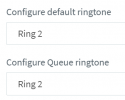
So to replicate the behavior you are currently describing above, I think the phone would have to be setup like so:

1655716832143.png

1. Is this the case with your T46U for example?
2. Did you recently upgrade this deployment from V16 to V18?
 
So to replicate the behavior you are currently describing above, I think the phone would have to be setup like so:

View attachment 30642

1. Is this the case with your T46U for example?
2. Did you recently upgrade this deployment from V16 to V18?

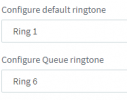
1. Nope, the ringtones are to set 1 and 6, which I believe to be the default for any provisioned Yealink. (We haven't changed it)

1655717426131.png
2. No we have been on V18 for several months.
 
Ok, kindly perform the following quick test:

1. Go on just one of the phones where the issue can currently be replicated and perform a factory reset.

2. When it comes up again, go to your management console and assign it to its existing extension, verifying that the ringtone selections are the same as we discussed

3. The phone should provision and reboot, when it comes back, please try to replicate again and let us know if that specific phone now behaves as expected or not

Let's confirm this first, and then we can pick up from where we left off
 
Ok I can confirm everything is the same prior to the reset.

However I made an error in my initial post - the queue ringtone is not the same. It is using ring 6 as expected (or whatever I change it to).

Only DID and ring group calls are affected.
 
Only DID and ring group calls are affected.
Ok so to clarify, you hear Ring 1 when a call arrives to your phone in this call flow?

DID call >> Your Extension >> Ring 1 Plays
DID call >> Ring Group >> Your Extension >> Ring 1 plays

Ring 1 sounds like a long "riiiiiiing"
Ring 2 sounds exactly the same but broken up as "riiing -riiing"
 
That's correct. Whereas before those calls would sound like ring 2 as you described.
 
Kindly log into the T46U if possible, so we can confirm it has been provisioned right.

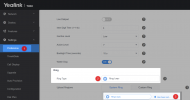
It should appear exactly like my example:

Preference Menu:
1655724572548.png


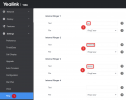
Ring Menu:
1655724714857.png

Do you get the same settings as mine?
 
Confirmed, all the same.
 
I will PM you with one more thing to check on your end.
 
I will PM you with one more thing to check on your end.
Hi there, I have been reading this and am facing the same issue! I've noticed it since the latest Yealink firmware update, please can you advise me on the solution?
 
Hi there, I have been reading this and am facing the same issue! I've noticed it since the latest Yealink firmware update, please can you advise me on the solution?
Hi James, this specific thread is not related to the firmware.

1. Read this first: https://www.3cx.com/community/threads/solved-yealink-ringtone-configuration.114670/

2. And if that does not already answer your question, read this and start a new thread as per the instructions: https://www.3cx.com/community/threads/information-to-provide-when-requesting-help.67558/
 
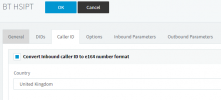
If anyone does happen to have this issue, I resolved it by unticking this box

1655905680895.png

By default, this is not ticked, but I had been playing around with the SIP settings whilst trying to get CLI passthrough for forwarding to mobile calls working... I thought I had reverted everything back but missed this one.
 
  • Like
Reactions: JohnS_3CX
If anyone does happen to have this issue, I resolved it by unticking this box

View attachment 30704

By default, this is not ticked, but I had been playing around with the SIP settings whilst trying to get CLI passthrough for forwarding to mobile calls working... I thought I had reverted everything back but missed this one.
Thanks - that has fixed the issue. However, is there a way to get this working with this turned on via custom templating or?
 
Status
Not open for further replies.

Members Online Now

No members online now.

Forum statistics

Threads
111,831
Messages
589,277
Members
164,660
Latest member
RJenkinsROCK