Yealink not registering after putting in VLAN

deepee

Bronze Partner
Basic Certified
Joined
May 31, 2019
Messages
18
Reaction score
0
I have put my Yealink T46S in a VLAN and it will not register. My YealinkT41P is in the same VLAN and it does register.
Both were not in a VLAN before, both worked fine, both moved at the same time into the VLAN and only one works.
I read about UDP being allowed into VLANS, I have a UNIFI UXG-Max and am told all ports are open outbound, is this an inbound issue?
I'm on 3cx v20.
 
I use VLANs extensively because of the security it offers and my phones are successfully configured on VLANs although TBH I do not use Yearlink phones so what I say will be generic rather than specific help.

You've also not said much about your configuration other than you have put two phones onto a VLAN, but VLANs are a security mechanism and configuring has to be precise or the whole thing will just not work.

When debugging VLAN issues I always find it helpful to go back to basics.

So to help me understand what may be causing your problem please tell me how you put you phones on your VLAN, there are usually two methods?
 
This is one for your network team.

How are you phones configured? is the routing correctly set up? You may be better off sticking an SBC in your VLAN.
 
There is no special configuration they are provisioned to connect to the hosted PBX. When they were added to a VLAN on a 3cx UXG-Max they stopped working. They are getting IP addresses etc so it must be something to do with UDP but the VLAN is open.
 
I am contemplating an SBC but it all worked fine before and i'm keen to find the problem
 
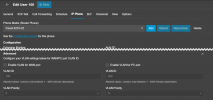
During your migration to a VLAN, did you also enter your VLAN settings in the Phones provisioing settings?

1732867559044.png

At the end of the day, the request will need to come from the phone to the PBX in order to register, so if the network settings are not correct the request wont come in.
 

Forum statistics

Threads
111,958
Messages
589,934
Members
164,861
Latest member
LewisJC