Yealink phone and bad echo

Status
Not open for further replies.

Callinectes

Silver Partner
Joined
Nov 19, 2020
Messages
196
Reaction score
53
We have a need for an SBC for a customer with an employee working from home. Previously the employee had the SBC software running in Windows and a Yealink T46 which worked fine but the computer running the SBC was behind the phone which made for some weird troubleshooting problems. We decided to replace the T46 with a T53 configured as an SBC phone. The user has swapped out the T46 for the T53 router phone and now the user has reported that on every call the caller/called party can hear themselves echo after they talk. The user does not hear an echo, only the other end of the call hears themselves being repeated. We tested this and can confirm that it is happening and it is very clear. It does not happen on speakerphone calls, only on calls where the T53 user uses the handset. We had them swap to the T46 handset (still using the T53 phone) and the echo was still present. There is no echo when they swap back to their T46. Can someone tell me why this is happening with the T53 and not the T46? Is the configuration profile for the T53 missing an echo suppression setting perhaps?
 
Are you using the ip phone in CSTA mode with the 3CX Client?
 
Can you confirm this?
Also if it not in CSTA mode the issue is the same?
 
Can you confirm this?
Also if it not in CSTA mode the issue is the same?
It will take a little time but I will try; this is a customer phone and is deployed to their employee’s home. How would CSTA be disabled, through the phone’s web interface?
 
Yes correct, just access the client and in the dialer de-select the CSTA mode.
 
Yes correct, just access the client and in the dialer de-select the CSTA mode.
I do not see that option. Can you send me a (or some) screenshot(s) of what you're describing?
 
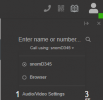
Once you open a Webclient for the same extension, and in its dialer you can see the your Phone (screenshot below), that will mean that the Weblcient will send the instructions via uaCSTA protocol to to the phone.
So as my colleage advised, you can switch from the phone to Browser mode

1699882416691.png
 
Once you open a Webclient for the same extension, and in its dialer you can see the your Phone (screenshot below), that will mean that the Weblcient will send the instructions via uaCSTA protocol to to the phone.
So as my colleage advised, you can switch from the phone to Browser mode

View attachment 38200
Okay, had the user set their dialer to Desktop App (they aren't using the web client/Browser) and then had them call directly from the phone's dial pad. The problem still occurs and did not change at all.
 
So now you receive calls directly to the device correct?
What is your firmware version?
 
Yes. Whatever firmware is recommended for the device and provisioned by the PBX.
 
Using only the web client, the issue is the same?
 
No. We have tested multiple scenarios. Web client, Desktop App, and the Yealink T46 she is using now all work normally. This problem only occurs with the Yealink T53.
 
You need to eliminate the cause and check further. For example the same setup on a different network has the same issue?
If not then you need to check the specific network.
 
So, while I completely agree with your troubleshooting steps and will have the user test a different network location as soon as possible (which won't be soon since they work from home), this is a huge problem for us. These SBC phones are supposed to fix problems related to networks, firewalls, and routers. In this case I know that the phone is connected directly to the user's cable modem/router device supplied by the carrier and so is her T46 which works without this problem via the SBC software running on her computer, which is attached to the T46 directly. What you're describing as the possible problem in this case would be introduced by the router phone, a case in which it should actually be solving this type of problem. It's the most basic of networks, and we're using a recommended phone configured in a supported way. This is not a promising situation and I am frankly very disappointed with my first experience with your router phone option.
 
I have at this point deployed over 80 sbc yealink t5x phones in router mode. Not one complaint of echo. Just fyi it could be a local issue or perhaps a bad phone.
 
  • Like
Reactions: SteveITS
I have at this point deployed over 80 sbc yealink t5x phones in router mode. Not one complaint of echo. Just fyi it could be a local issue or perhaps a bad phone.
Yes, it could be a bad phone, though it was tested before deployment. We’re going to test in another location but will take a while. Could also be network but highly unlikely since it’s just a modem/router, a PC, and a phone, and other phones such as a T46 with the PC running the SBC, and softphones work fine in the same location. In fact they have the T46 in use while we work on this.

Are any of your deployed router phones the T53 (not T53W)?
 
I’m 99% sure without looking the last one we put in had a few non-Ws.

If you set the phone to use the PC as its SBC does the problem go away?
 
I’m 99% sure without looking the last one we put in had a few non-Ws.

If you set the phone to use the PC as its SBC does the problem go away?
That’s on the list to test but it’s very hard to coordinate testing like this with a person busy working from home. We’ll get it done in the next few days hopefully.
 
Tested lots of T53, T53W, T54W and a few T57W.
 
Status
Not open for further replies.

Forum statistics

Threads
112,148
Messages
590,963
Members
165,170
Latest member
SupportRock