Yealink Phone Firmware Not Updating Since Upgrade to V20

NJohnson

Premier Customer
Joined
Jan 30, 2021
Messages
28
Reaction score
13
As the title of this thread suggests, I can no longer update Yealink phone firmware from the admin console since upgrading to V20. You can click the "Upgrade" link on the phone page in the 3CX admin console, and it says it's going to update it, gives you the pop-up message "The phone will disconnect during the firmware update. This will take about 5 minutes", but it never updates. This worked perfectly in V18 and never had any kind of issue with it. We have 2 models of phones we use, Polycom VVX311 and Yealink SIP-T66U and it seems that the Polycom phones will actually update most of the time and the Yealink phones never update. This is but one of the several issues I have with V20, but those are not as big as not being able to upgrade firmware. Anyone have any advice?
 
it does appear that there are files in the yealink folder (we're on Windows)
Mode LastWriteTime Length Name
---- ------------- ------ ----
-a--- 18/11/2024 9:36 PM 347008 patchT54W(T57W,T53W,T53,T53C,T54,T57)-96.86.0.23.rom
-a--- 18/11/2024 9:36 PM 29228320 T4XS-66.84.0.35.rom
-a--- 18/11/2024 9:36 PM 29208656 T4XS-66.84.0.95.rom
-a--- 18/11/2024 9:36 PM 25559152 T4XS-66.85.0.5.rom
-a--- 18/11/2024 9:37 PM 23192144 T4XS-66.86.0.15.rom
-a--- 18/11/2024 9:36 PM 23180704 T4XS-66.86.0.5.rom
-a--- 18/11/2024 9:36 PM 36793152 T4XU-108.86.0.20.rom
-a--- 18/11/2024 9:36 PM 39492992 T4XU-108.86.0.77.rom
-a--- 18/11/2024 9:38 PM 48067392 T4XU-108.86.0.93.rom
-a--- 18/11/2024 9:36 PM 42373888 T54W(T57W,T53W,T53,T53C,T54,T57)-96.86.0.23.rom
-a--- 18/11/2024 9:36 PM 33026048 T5XW-96.85.0.5.rom
-a--- 18/11/2024 9:36 PM 45812896 T5XW-96.86.0.71.rom
-a--- 18/11/2024 9:37 PM 45811712 T5XW-96.86.0.72.rom
-a--- 18/11/2024 9:37 PM 47048128 T5XW-96.86.0.74.rom
-a--- 18/11/2024 9:37 PM 47213184 T5XW-96.86.0.76.rom
-a--- 18/11/2024 9:37 PM 47237264 T5XW-96.86.0.77.rom
-a--- 18/11/2024 9:39 PM 47230560 T5XW-96.86.0.81.rom
Phones config reports current firmware 66.85.0.5 (66.86.0.15 is available) which appears to match the model T46S current and available Firmwares. I will try to load the versions in between these to see if it's a phone firmware issue
 
@Neil_Mc I recommend you start a new thread instead of tagging onto this one. Before you do keep in mind that:

- if your phones are local then split DNS is a requirement https://www.3cx.com/blog/releases/split-dns-on-prem/
- if you use a custom FQDN and certs, you have to make sure the chain is complete
 
Thank you John. Split DNS is being used, as has been the case for some time. For example, our mobile clients can successfully utilise the on-prem server both on Lan (using local lan DNS resolution) and publicly (with public DNS resolution and NAT forwarding to our on-premises server). the outbound firewall tests all pass on the on-premises solution.

The SSL certificate in use on the server is publicly signed, although i don't know for certain that the yealink phones are happy with this - would it affect provisioning?

If there are any diagnostics you can recommend to validate either of these two items i would appreciate that.

putting those two things aside, do you think the config Firmware URL should show a specific rom file in the config? or is that passed to the phone as an argument / rom target file name to append to the URL?
 
The SSL certificate in use on the server is publicly signed, although i don't know for certain that the yealink phones are happy with this - would it affect provisioning?
Yes it would - they will fail to provision or pull firmware

do you think the config Firmware URL should show a specific rom file in the config?
No it should not. It will only show a specific rom temporarily when you send the upgrade command from the 3CX Admin Console.
 
Yes it would - they will fail to provision or pull firmware
ok great, this matches my thinking. I can provision with no problems. Factory reset the phone, option 66 discovers the provisioning URL and the phone provisions. I can command provisioning from the admin GUI, and launching the phone URL's shows that the provisioning successfully updated the phones web credentials. So am confident that we can provision.

Is there any logging on the phone that would show what's happening when we command upgrade?
 
Actually on further inspection, when I request 'reprovision' on the admin console, or on the phone menu, there's no provisioning light flash. I will dig into this further, it could be that the initial provisioning is happening on the workstation VLAN but further provisioning is not functioning once the phone is on the Voice VLAN.
 
after getting this machine onto our Voice Vlan, i was unable to find anything of concern in either the certificate chain, DNS resolution, or access to the 3CX instance.

Can you recommend any further diagnostics to see why provisioning or firmware updates may be failing?
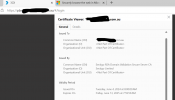
3CX certificate.png
 
I dont think the Sectigo CA is included in the Yealink built in CA
 
I dont think the Sectigo CA is included in the Yealink built in CA
ok that's a possible lead for me to explore, thanks

(btw thank you for all your help so far)

This is the same certificate and issuer that we've been using on 3cx for years
 
The dead giveaway is if you change something like a BLF and the phone fails to reprovision.

You might also want to look at how to check your cert chain as sometimes intermediate certificates are needed and are missing. Your HTTPS 3CX port must correctly forwarded and accessible externally, then use this tool https://www.sslshopper.com/ssl-checker.html
 
Thanks John

Disabling the option to only use Trusted CA's allows firmware update and provisioning again.

I will look into a different Certificate. I don't understand why this would have changed in upgrading v18 to V20, i'm guessing the trust settings have been changed somehow in the phone profiles as a) it was working before v20 and b) the intiial provisioning works after factory reset but not after provisioning
 
After provisioning we enforce only trusted to ensure security. Initial provisioning basically doesn't have limitations, but after the template enables it, any issues you have will become apparent. Broken chain issues, incompatible cert issues, time issues that sort of thing.

This is why we recommend using 3CX built in FQDN and certs, as we do test those against supported phones. If you go the custom route challenges may arise and your current certs might not remain compatible, especially as we transition away from less secure ciphers to more secure ones.
 
Is there a migration path to a 3CX fqdn?
 
I dont think the Sectigo CA is included in the Yealink built in CA
Back in the V16 days, we used custom FQDN and certs by Sectigo, Had nothing but problems, Not trusted by Yealink, Not trusted by PI, Had to disable Provisioning link from phones and much more. I would avoid Sectigo at all costs
 
Just came to say that the issue in our case was the provisioning URL on the phones were still pointing to port 5000. REsetting the provisioning URL and sending the update to the phones again resolved the issue.
 
would avoid Sectigo at all costs
Wish i had known that back in the day ;)

I did have some success adding the sectigo CA to the phones manually, but it was a pain and i was unable to automate it.

We moved to Lets encrypt and the phones provisioned flawlessly.

for some reason, Update 7 has brought our expired sectigo certificate back, and i'm unable to to find where it's stored.
 

Forum statistics

Threads
111,954
Messages
589,921
Members
164,852
Latest member
priya