Solved Yealink phone shows duplicate extensions

Status
Not open for further replies.

[email protected]

Premier Customer
Joined
Jan 12, 2016
Messages
10
Reaction score
0
Hi all,

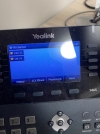
I have a 3CX setup with Yealink T46S IP phones. Some of my phones have duplicate extension showed on the main display. The phones are autoprovisioned, and there are no duplicate entries in the phone list
 

Attachments

  • MicrosoftTeams-image (1).png
    MicrosoftTeams-image (1).png
    585.2 KB · Views: 15
the phone says "no service" in the corner so I dont believe the provisioning is being successful.

What is the provisioning type of the phone?

Factory reset the phone, check it's on the latest firmware and try provisioning again.

https://www.3cx.com/support/phone-firmwares/
 
  • Like
Reactions: AWS2P
Actually, this is happening when the service is restored. The phone is on the latest firmware 66.85.0.5. The provsioning type of the phone is automatic via https, served via DHCP option 66.
 
Have you specified "line" BLF keys under that extension?
 
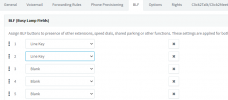
This is my setting for that extension
 

Attachments

  • BLF.png
    BLF.png
    20.1 KB · Views: 31
The "Line" BLFs is why you see those 2.

The EXT registration is in the far upper left corner. The 2 you see are the keys.

clear those BLF keys and the problem goes away (or the 2nd one at least)

dont forget to reprovision.
 
Thank you, this solved this issue
 
Status
Not open for further replies.

Members Online Now

No members online now.

Forum statistics

Threads
111,831
Messages
589,277
Members
164,660
Latest member
RJenkinsROCK