Yealink T-46S Firmware Update

Status
Not open for further replies.

zwab

Customer
Basic Certified
Joined
Oct 15, 2021
Messages
4
Reaction score
1
  • 3CX Version, 18.0 Update 1 Build 234
  • Server OS, Debian 10
  • Is the 3CX Server Hosted and where? On-premises
  • IP Phone Make/Model/Firmware version, Yealink T-46S 66.82.0.22 and .30
  • Provisioning Method: SBC
  • Trunk Provider or VoIP Gateway Make/Model, Voxtelesys
  • Has the Firewall Checker passed: YES
  • Are custom Phone Templates being used: NO
  • SBC build version: 18.0.30
Hello,
I'm currently having issues doing firmware updates on five Yealink T-46S phones behind an SBC, I have the same phone model in front of the SBC and they can update without issues, I also have the same phone model behind different SBCs on the same PBX and they can update What happens when trying to update is that the new firmware version is listed on the phone in 3CX but within a few seconds they seem to revert back to the unsupported firmware. I've tried manually uploading a version 66.84 firmware and the latest supported 66.86.0.5 firmware to those phones but experience the same behavior. This happened with Debian 9 ver 16 of the pbx as well, I was hoping updating might fix it. I've also tried disabling option 66 in DHCP with no luck. Can someone point me in the right direction on what to look at here? Thanks.
 
  • 3CX Version, 18.0 Update 1 Build 234
  • Server OS, Debian 10
  • Is the 3CX Server Hosted and where? On-premises
  • IP Phone Make/Model/Firmware version, Yealink T-46S 66.82.0.22 and .30
  • Provisioning Method: SBC
  • Trunk Provider or VoIP Gateway Make/Model, Voxtelesys
  • Has the Firewall Checker passed: YES
  • Are custom Phone Templates being used: NO
  • SBC build version: 18.0.30
Hello,
I'm currently having issues doing firmware updates on five Yealink T-46S phones behind an SBC, I have the same phone model in front of the SBC and they can update without issues, I also have the same phone model behind different SBCs on the same PBX and they can update What happens when trying to update is that the new firmware version is listed on the phone in 3CX but within a few seconds they seem to revert back to the unsupported firmware. I've tried manually uploading a version 66.84 firmware and the latest supported 66.86.0.5 firmware to those phones but experience the same behavior. This happened with Debian 9 ver 16 of the pbx as well, I was hoping updating might fix it. I've also tried disabling option 66 in DHCP with no luck. Can someone point me in the right direction on what to look at here? Thanks.
The only reason the phone would rollback its firmware is if the URL set in the provisioning template is wrong. Are you 100% sure you don't have any custom templates?
 
Hi, I am also having an issue updating the firmware on two of the Yealink T46S devices on a specific customer. The other phones installed and firmware updated with no issue. This happened about the time the hotfix went in and I've been trying to figure it out since.

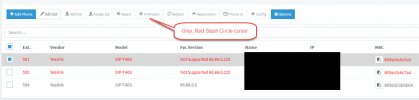
I can see the devices, but when I select one (or both), the "Firmware" tab stays grey.

The two phones are currently on 66.84.0.125. The 3CX is hosted, v18.0 Update 1 (Build 234).

-g
 
Hi, I am also having an issue updating the firmware on two of the Yealink T46S devices on a specific customer. The other phones installed and firmware updated with no issue. This happened about the time the hotfix went in and I've been trying to figure it out since.

I can see the devices, but when I select one (or both), the "Firmware" tab stays grey.

The two phones are currently on 66.84.0.125. The 3CX is hosted, v18.0 Update 1 (Build 234).

-g
In your case, if the button doesn't come up, it's because the phone is not configured correctly in the system. Meaning, it's not in a Phone Provisioning tab of anyone.
 
That's an interesting idea, so I went and looked.

Both of the rows are associated with an extension (user) in the Phone list. I then went and checked the provisioning tab for each users and the phone shows up.

The users report the phones are working.
 
That's an interesting idea, so I went and looked.

Both of the rows are associated with an extension (user) in the Phone list. I then went and checked the provisioning tab for each users and the phone shows up.

The users report the phones are working.
Screenshot please, in this case the Firmware button should be enabled.
 
Let's see, I have the worst luck posting pictures

NotAble2Firmware.jpg
 
I was able to update the firmware on the 504 extension, but it started @ 66.85.... or so. It was newer than the two that are having the issue.
 
I was able to update the firmware on the 504 extension, but it started @ 66.85.... or so. It was newer than the two that are having the issue.
Try upgrading those 2 manually to 66.85 and then bring them up to supported firmware.
 
Yeah, that was going to be my next step, but I'll have to do that in conjunction with the client.

I figured it couldn't hurt to ask here first :)

Thanks,
-g
 
  • Like
Reactions: Evolute IT
  • 3CX Version, 18.0 Update 1 Build 234
  • Server OS, Debian 10
  • Is the 3CX Server Hosted and where? On-premises
  • IP Phone Make/Model/Firmware version, Yealink T-46S 66.82.0.22 and .30
  • Provisioning Method: SBC
  • Trunk Provider or VoIP Gateway Make/Model, Voxtelesys
  • Has the Firewall Checker passed: YES
  • Are custom Phone Templates being used: NO
  • SBC build version: 18.0.30
Hello,
I'm currently having issues doing firmware updates on five Yealink T-46S phones behind an SBC, I have the same phone model in front of the SBC and they can update without issues, I also have the same phone model behind different SBCs on the same PBX and they can update What happens when trying to update is that the new firmware version is listed on the phone in 3CX but within a few seconds they seem to revert back to the unsupported firmware. I've tried manually uploading a version 66.84 firmware and the latest supported 66.86.0.5 firmware to those phones but experience the same behavior. This happened with Debian 9 ver 16 of the pbx as well, I was hoping updating might fix it. I've also tried disabling option 66 in DHCP with no luck. Can someone point me in the right direction on what to look at here? Thanks.

Hi @zwab The minimum version your phones need to be able to upgrade to the latest is 66.84.0.35 as described here https://www.3cx.com/sip-phones/yealink-t4-series/ and you have to manually install that firmware on your phones the first time otherwise the upgrade will be rejected by your phones.

I suggest to take just one phone from the affected site, factory reset it, and then manually install the version I mentioned in the linked document above.

Once the phone accepts it and the upgrade is complete, you may then try to provision it. It should appear in your Phones section after the provisioning is done, and should report its firmware as version 66.84.0.35 which is what we expect to see.

Now, you can finally send the latest update via your 3CX management console, which should successfully upgrade it to 66.86.0.5


@Virtualis Solutions your issue was something entirely different (management console button greyed out). Try to start a new thread in the future instead of hijacking an existing one ;)
 
  • Like
Reactions: zwab and Evolute IT
Thanks John for the gracious and understanding reply. At the time I originally posted the note, it looked the same to me so it seemed appropriate to add to it.
 
Hi @zwab The minimum version your phones need to be able to upgrade to the latest is 66.84.0.35 as described here https://www.3cx.com/sip-phones/yealink-t4-series/ and you have to manually install that firmware on your phones the first time otherwise the upgrade will be rejected by your phones.

I suggest to take just one phone from the affected site, factory reset it, and then manually install the version I mentioned in the linked document above.

Once the phone accepts it and the upgrade is complete, you may then try to provision it. It should appear in your Phones section after the provisioning is done, and should report its firmware as version 66.84.0.35 which is what we expect to see.

Now, you can finally send the latest update via your 3CX management console, which should successfully upgrade it to 66.86.0.5


@Virtualis Solutions your issue was something entirely different (management console button greyed out). Try to start a new thread in the future instead of hijacking an existing one ;)

JohnS,
Thank you very much for your guidance. I will try what you have suggested.
 
  • Like
Reactions: JohnS_3CX
@zwab sure thing, and let us know how you get along

@Virtualis Solutions no problem, and we will be by your side regardless!
 
Status
Not open for further replies.

Members Online Now

Forum statistics

Threads
111,832
Messages
589,278
Members
164,662
Latest member
DejanMDS