- Joined
- Jun 24, 2023
- Messages
- 5
- Reaction score
- 0
I'm looking at a new cloud based PABX but want to try out 3CX as the on-site server did not work at all for me.
I've now created one extension and the following link
https://www.3cx.com/sip-phones/yealink-t20p-t22p-t26p-t28p/#h.eu8l0fu5cgny
Does not tell you where you get the details for the IP phone to manual config the phone. The steps that are given is as follow: (see my comments in red)
I've now created one extension and the following link
https://www.3cx.com/sip-phones/yealink-t20p-t22p-t26p-t28p/#h.eu8l0fu5cgny
Does not tell you where you get the details for the IP phone to manual config the phone. The steps that are given is as follow: (see my comments in red)
- Go to the “User” for which you want to add the DECT phone.
- Go to the “IP Phone” tab. Click “Configure a phone” to add a phone.
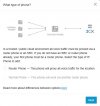
- Select the option “Outside the Office” and click “Next”. <- This option does not come up
- Select “Normal Phone” and enable the option to “Configure your phone manually without provisioning <-- This option is greyed out