Solved Yealink T23G Phones & Firmware

Status
Not open for further replies.

pgriffith

Customer
Joined
Mar 10, 2020
Messages
5
Reaction score
3
Hi all

New to 3CX, getting the hang of it, everything is working fine, except . . .

I have a client with a mix of T22P(17), T23G(2) & T28G(2) phones. All of them were showing their firmware as not supported. So I have upgraded them all to the latest firmwares as provided by 3CX, not Yealink.

They are now all showing as supported except for the 2 x T23G phones. Even though they have the latest 3CX 44.84.0.95 firmware installed on them, and the server console also shows that as the installed version, the server still says they are unsupported.

Any idea why?

Running latest version 16 on a Windows PC.
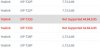
firmware.JPG
 
Can you tell us the exact version of your PBX? Also check the updates section of the PBX and see if there are any firmware updates pending.
 
Can you tell us the exact version of your PBX? Also check the updates section of the PBX and see if there are any firmware updates pending.

My mistake, it's not 16 as mentioned in my original post, the version of the PBX is 15.5.15502 and as for updates ..

Your system is up to date. Last checked: Today, 23:46
 
Then i am guessing that you did the update manually and not through the management console of 3CX.
Since you are running 15.5 the supported firmware for these phones is 44.83.0.55.

The version 44.84.0.95 is not available for V15.5. So the PBX sees that there is a mismatch with the firmware so you get the warning.

I would recommend upgrading your PBX to the latest version of V16 so you can get all the latest updates and fixes.
 
  • Like
Reactions: pgriffith
Then i am guessing that you did the update manually and not through the management console of 3CX.
Since you are running 15.5 the supported firmware for these phones is 44.83.0.55.

The version 44.84.0.95 is not available for V15.5. So the PBX sees that there is a mismatch with the firmware so you get the warning.

I would recommend upgrading your PBX to the latest version of V16 so you can get all the latest updates and fixes.

Yes, I couldn't get the phones to update through the PBX UI for whatever reason.

Is there any way to download these older files so I can perform a manual update?

There are plans to install V16 in a new Hyper-V environment at some point in the future, but there are more pressing IT concerns to be addressed first.

Thanks very much for your help.
 
The supported firmware should be downloaded in your system. If you are running the PBX in Windows then the firmware should be located at: C:\ProgramData\3CX\Instance1\Data\Http\Interface\provisioning\<random_folder>\firmware (or firmware_new)\yealink

Since you are planning to upgrade however and you do not have any issues with the firmware you are running now you can just leave the phones as they are and save some time later. The only drawback is the not supported flag.
 
  • Like
Reactions: pgriffith
Thanks Yiannish

Dug the firmware out and flashed manually, now supported across the board.

Many thanks
 
  • Like
Reactions: YiannisH_3CX
Glad i could assist
 
Status
Not open for further replies.

Latest Posts

Forum statistics

Threads
111,939
Messages
589,843
Members
164,824
Latest member
Xeniosg