Solved Yealink T42U as a Router Phone auto-provisioning

Status
Not open for further replies.

AcksiosKim

Free User
Joined
May 6, 2024
Messages
15
Reaction score
1
This is my first installation.

I have been trying to provision a Yealink T42U as a Router Phone but have not gotten anywhere
The firmware has been updated to 108.86.0.90 as required in the guide.
When I put the Auto provision URL from 3CX I get a successful message on the phone web console dashboard and I reboot the phone - it says configuring and register skipping and No Service

The phone has been registered on the Admin Console, Voice & Chat tab but it is red.

What else should I check? Any local firewall rule that I need to add?
I do not know the cause therefore I can't come up with a potential solution.
Any thoughts?
 
Thanks, I factory reset it and updated it to the right firmware. I removed the phone from the system. I added the phone again.
Still not provisioning and getting "updating skipped" message.

It still appears on the 3cx admin console. My process of auto-provisioning
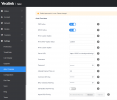
- go to the phone web interface.
- Setting - Auto Provision
- fill in the Server URL with the auto-provisioning link from 3CX.
- Click Auto Provision Now and confirm.
- go to the upgrade tab and reboot.

Is there any step I missed?
 

Attachments

  • Screenshot 2024-05-17 084253.png
    Screenshot 2024-05-17 084253.png
    66.6 KB · Views: 19
Last edited:
You shouldn’t need to do anything on the phone itself. Add as a Direct phone, I believe it’s called now without looking, and add it as a router phone. Then power on the phone and it should self configure.
 
  • Like
Reactions: AcksiosKim
Please refer to this guideline of how to provision the phone. Keep in mind that you also need to ensure that you are on the latest firmware.
 
Please refer to this guideline of how to provision the phone. Keep in mind that you also need to ensure that you are on the latest firmware.
hum....I did follow that guideline....is it the latest firmware or the latest supported firmware?
 
The latest supported firmware. In the guideline as you can see it does not require to copy the URL and add in the phone.
You can add the device in the PBX and select Connect Directly to provision as Router Phone.
 
The latest supported firmware. In the guideline as you can see it does not require to copy the URL and add in the phone.
You can add the device in the PBX and select Connect Directly to provision as Router Phone.
Thanks for the comments. It really means a lot.
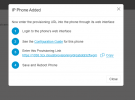
I know the instruction doesn't say that but when I add a phone at the very end of the process this pop-up shows up.

So you are saying, not to do this.

Add the phone and just reboot?
 

Attachments

  • Screenshot 2024-05-17 105814.png
    Screenshot 2024-05-17 105814.png
    22.5 KB · Views: 31
Yes press OK and then press save. Then you will see in the Event Log that an RPS request has been sent to the phone, once rebooted it will work.
 
I am still struggling. reset it all I see the RPS request has been sent out successfully. But my phone still says no service. What question should I ask myself to fix this?
 
Have you also updated the firmware?
 
Yes, I did! 108.86.0.77. :)
 
So all seems ok from the PBX side. This means that the phone cannot get the provisioning link from the RPS.
Any restrictions on your firewall?
 
What do we need to make it allow it? We have Sophos XG. I am not a firewall expert. Is there anything that I need to look for?

My previous colleague said we block everything first and open up one at a time as we need to........... As I am saying this... I should have known this might be the problem. :rolleyes:

What should I do if I need to make changes on the Firewall? Would you point me in the right direction?
Is this post gonna help anything?

http://forum.yealink.com/forum/archive/index.php?thread-42430.html
 
Last edited:
This has to be checked with your network administrator.
 
This has to be checked with your network administrator.
:oops: I am the network administrator... I will do some more research. Of course, you can't help me because you can't see our firewall rules.

Thank you so much for your help. :) I will post once I work out for future some people like me. :) Thanks again for your help.
 
You are welcome, let us know the outcome ;)
 
AcksiosKim

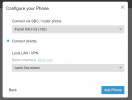
Make sure that at step 2 of adding the phone you indeed select "Connect Directly" as in the picture below.
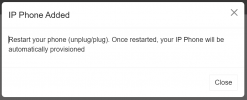
Then at the end you should see "Reboot the phone" popup (second picture), not the one you are seeing.


Attachments

  • directly.PNG
    directly.PNG
    30.4 KB · Views: 36
  • reboot.PNG
    reboot.PNG
    17.5 KB · Views: 32
Hi, I have a similar problem.

I have updated the phone to the latest supported firmware, tried factory reset and it is getting provisioned automatically and it is marked as a router phone on extension list. Even when I go to edit extension, on the IP Phone tabe it uses it as SBC, but it still says no service.

The guide is not specific either way - do I need to set up any port forwarding for my router phone?
 
Just ran the firewall check. Ports 5060 and 5090 have been remapped.
I have both ports confirmed opened on the firewall, however, 3CX firewall still says they have been remapped. I have checked few other posts and they are suggesting ALG on the firewall might be the issue.
My 3CX mobile app still seems to be functioning normally, but I was wondering if this is causing the issue with the desk phone? It provisiones fine but displays no service which if I understand correctly, would be SIP service on 5060 on the server.
 
Status
Not open for further replies.

Forum statistics

Threads
111,974
Messages
590,083
Members
164,900
Latest member
Silent_Guru