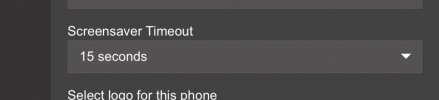
Yealink T42U screen saver displays "3cx"

Status
Not open for further replies.

JMBrutovsky

New User
Joined
Feb 17, 2024
Messages
5
Reaction score
1
I am using version 20 of the free tier of 3CX with a Yealink T42U phone, and the screen display changes between the time and button display and then a blank screen with just a "3CX" in the middle and then back to the normal phone screen. Is there a way to change, disable, or delay the "3CX" from displaying, or is this embedded in the firmware because I am using the free version? It's not a huge problem, I am just wondering if anyone has figured this out. All information that I have been able to find so far is outdated.
 
You can disable the screensaver in the phone settings in 3CX.

In the free and Pro version, the background with the logo is the default and cannot be changed. Yealinks use the background as screensaver.
 
  • Like
Reactions: JMBrutovsky
I do not see any screen saver options in the 3CX console. Where do I find that setting?
 
IMG_4420.jpeg
You should see it there. If it's not there, you may be using SMB which is not v20 yet.
 
Unless it's changed, my note said, "Free/SMB phones: cannot set 12/24h, VLAN, screensaver, etc. The only options that are available are language, ringtone, and transfer method."
 
I am not using SMB. I am letting 3CX host for me. I am also using the T42U as a router phone.
In v18 configuring it as router phone you don't have the screensaver option nor logo when using the web client, however if you edit the user from the management console then there you have that option.
 
Status
Not open for further replies.

Forum statistics

Threads
111,832
Messages
589,284
Members
164,662
Latest member
DejanMDS