


- Joined
- May 22, 2024
- Messages
- 9
- Reaction score
- 3
I am trying to add an IP Phone to an extension and after entering the mac address, selecting our SBC the wizard goes back to the MAC address and says it is already in use.
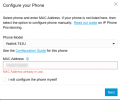
We do not use the Yealink RPS services. I have verified that the MAC address is NOT listed in our list of phones. Adding a brand new phone works without issues. Configuring the phone manually works as well, but this is not the desired setup.
Any help would be appreciated.
We do not use the Yealink RPS services. I have verified that the MAC address is NOT listed in our list of phones. Adding a brand new phone works without issues. Configuring the phone manually works as well, but this is not the desired setup.
Any help would be appreciated.


