Yealink T43U one firmware version behind wont provision as SBC phone!

ebrowne_sts

Platinum Partner
Advanced Certified
Joined
Jul 22, 2020
Messages
98
Reaction score
43
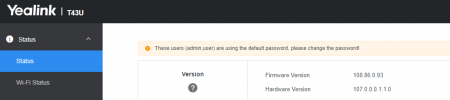
I tried rolling out multiple T43Us on firmware 108.86.0.90 as SBC phones, but I guess a new firmware just dropped (108.86.0.93), which now meant the phones are one firmware behind and will not provision with 3CX. We are on the latest 3CX v20 U3. If I were to actually deploy these phones to a customer, before realizing there was a new firmware, they would not provision onsite unless I upgraded each phone one by one to the latest.

I would like to setup phones this way to avoid having to put a Pi onsite or having to put phones behind other SBC phones. If this is no longer recommended, please let me know, as I am going by what Nicholas P. mentioned in multiple webinars that setting up all phones as SBC phones should be no problem.

Is it possible for 3CX to allow the last 2 firmwares at least to be able to register as SBC phone? Or at least let the slightly older firmware do a minimal provision in 3CX so the new firmware can be pushed from there and then the phone would register.

 
1729113774728.png

Only after manually upgrading the firmware to latest would it stop rejecting the SIP Register request.
 
It’s not that it’s one version behind. Only certain versions of the firmware have the sbc inbuilt. If it’s not working it’s a firmware without sbc. There are slightly older versions that do have sbc. On large orders we get our supplier to update the firmware before shipping.
 
Ok that makes sense. Not sure if we can get our supplier to do the same lol
 
  • Like
Reactions: JohnS_3CX
You need to ensure that the ip phones are always using the latest 3CX Supported and Tested firmware version to avoid any issues but also get the phone ready to be used as a router phone.

@JohnS_3CX

I am resuming this discussion, as I am experiencing problems with the T43U router phones.

Screenshot 2024-10-30 123914.png
Screenshot 2024-10-30 120117.pngScreenshot 2024-10-30 120137.pngScreenshot 2024-10-30 120223.pngScreenshot 2024-10-30 120404.png

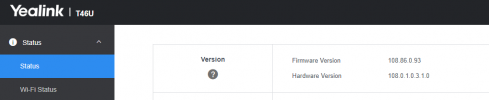
in a nutshell, from what you can see I have two phones to become routers, the first one the T46U applying the firmware that you download from the 3cx site, it works regularly ( although now that it is registered on the PBX it wants me to revert the phone to an older version)
I am experiencing the problem on the T43U phone, which with any version does not register and does not take the information even if I load the URL string by hand.
I have also tried registering it in another PBX that already has T43Us running as routers registered with V18 is now are running with V20, it is also not working there anymore.
 

@JohnS_3CX

I am resuming this discussion, as I am experiencing problems with the T43U router phones.

View attachment 44830
View attachment 44829View attachment 44831View attachment 44832View attachment 44833

in a nutshell, from what you can see I have two phones to become routers, the first one the T46U applying the firmware that you download from the 3cx site, it works regularly ( although now that it is registered on the PBX it wants me to revert the phone to an older version)
I am experiencing the problem on the T43U phone, which with any version does not register and does not take the information even if I load the URL string by hand.
I have also tried registering it in another PBX that already has T43Us running as routers registered with V18 is now are running with V20, it is also not working there anymore.
A few things might be wrong here and at first look it seems something to do with your networking or DNS or the machine not being updated/updatable.

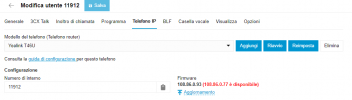
1. We released 108.86.0.93 a while ago, your PBX should not be offering .77 unless it has a problem and cannot receive updates. Check the updates page please.

2. I have successfully provisioned both T43U and T46U on the latest v20.0 Update 3 (Build 806) as router phones. Make sure your PBX is also updated from the updates page (System > Updates)

Perhaps if your PBX cannot see the new firmware, it might also mean that it cannot be seen by the phones so they can get their provisioning files.


PS: Please do not hijack other threads, your issue is not the same as the original issue (user had non 3CX firmware installed with no router function built in). It's better to start a new thread in the Yealink section https://www.3cx.com/community/forums/yealink/
 
  • Like
Reactions: TheodorosG_3CX

Members Online Now

No members online now.

Forum statistics

Threads
111,831
Messages
589,277
Members
164,660
Latest member
RJenkinsROCK