Yealink T4x config file for SP6

Status
Not open for further replies.

[email protected]

Forum User
Joined
Oct 13, 2016
Messages
28
Reaction score
2
Starting at SP6, I notice in the Yealink t4x XML file the SIP-T46G is displayed as Yealink T46. There is no entry for T46G (it is identified UA-SIP-T46G with a name of Yealink T46).

This is no problem if you going to configure new phones, but it it was selected as T46G from previous configuration then it can't find the correct one and defaults to the first config file in the system which is cyberdata emergency intercom.

I can fix the problem by editing the template to change the name back to T46G, but why was this changed at all?. I am not in the mood to re-provision 120 T46G just so the template can say T46 with the stock one.
 
Starting at SP6, I notice in the Yealink t4x XML file the SIP-T46G is displayed as Yealink T46. There is no entry for T46G (it is identified UA-SIP-T46G with a name of Yealink T46).

This is no problem if you going to configure new phones, but it it was selected as T46G from previous configuration then it can't find the correct one and defaults to the first config file in the system which is cyberdata emergency intercom.

I can fix the problem by editing the template to change the name back to T46G, but why was this changed at all?. I am not in the mood to re-provision 120 T46G just so the template can say T46 with the stock one.
Hi Phil,
We are using the 3CX starting from V12 and I don't remember the yealink T4 phones marked with G or P.
Most of our customers are using the yealink phones and I never saw the G or P marks for the T4 models in default 3CX provisioning template. Is it possible that you are modified the template and added the G or P marks for the T4 models?

As I remember the story was like this:
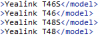
Yealink came up with the new T4 series in 2014. Yes, the SIP user agents had the G or P signs, but they were announced us the T4x (T46, T48...) models and not the T4xG (T46G). You can check one of the earliest T4x config guides.
3CX added them later in 2014 and used the same names - T46, T48 and etc...
In 2016 yealink added new models and called them T46S, T48S and etc...
After that, in config guides yealink called them T46G/S, but the problem was that we (3cx customers) already had the old models without G/P signs.
This is why and, probably, to avoid the problems as you have now, 3cx added them as T46 (no name changed) and T46S...
upload_2018-9-10_23-35-33.png

I think, some time ago, you (or someone else) modified the template and added the G or P marks for the T4 models.
Unfortunately, the only way that I can see is to manually re-provision the 120 phones :(
This is why in our company we are always using the default templates :rolleyes:
 
  • Like
Reactions: CentrexJ
Status
Not open for further replies.

Latest Posts

Forum statistics

Threads
111,894
Messages
589,600
Members
164,763
Latest member
Techmansam