Solved Yealink T54W - Account disabled

Status
Not open for further replies.

auxbit

Bronze Partner
Joined
Jul 13, 2023
Messages
10
Reaction score
1
Hi,

I have a T54W phone configured as a router phone on a on premises installation.

I have also 2 other normal phones.

All is working good, suddenly my router phone has "no service" (but the other 2 phones is online).
If I go to the web interface of the phone I see something strange, on the account 1, is all set up, the "line active" is on, but the register status is "Disabled".

I've reset to factory default, the phone is provisioning, configure all the set up, but is still "no service" and in "disabled" state.

The phone has the latest firmware 96.86.0.76.

How can I put the account out from disabled state?

Thanks,
Alex
 
Under the extension<<Options tab<<is the option "Block Remote Tunnel Connections (3CX App connections with Tunnel enabled & SBC will be blocked)" enabled?
 
No, this option is not enabled.
In the options and rights is all by default.

Yesterday I've tried to add a second account on the same phone and this was registered and active without problem.

So I think the problem is only with that extension.
 
Ok, first of all, multiple accounts(extensions) on one ip phone are not supported.
Furthermore, have you tried to regenerate the extension and the issue is the same?
 
The second account was only for test purpose.
Yes, I've try now to regenerate the extension, reset to factory default, reprovisioning, and is the same...is loading all the setup but "no service" and "Disabled" state is on unfortunately.
 
May i know where you see the "Disable"?
 
If I go on the IP phone webinterface I got the disabled state in the account (attached).
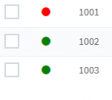
In the 3CX panel the extension 1001 is offline, but the other two connected on this router phone is online and can make calls. Obviously if I disconnect the router phone the other two is offline too.
So the router phone is connected and working, but only the entension 1001 has a problem with, I don't know
 

Attachments

  • disabled3cx.png
    disabled3cx.png
    3.4 KB · Views: 20
  • offline.png
    offline.png
    1.4 KB · Views: 19
Is the extension Disabled in the Options tab?
 
No...I told you that, all of a sudden, I restart the IP Phone and have this problem, no configuration was touched.
 
I would suggest that you factory reset the phone and delete it from the extension Phone Provisioning tab.
Re-create extension and re-provision from scratch.
 
Ok, I've found the issue....the phone when come up send a udp request to the PBX.
I close the udp connection for port 5060, 5061 and so on...so when the phone came up has no respond from PBX. Now I've open the port and all is going on correctly.

But is really interesting that the other two phones is going on normally and the router phone do his work and give the other two phones.

I don't see the problem until I've restarted the phone, because the phone send only a request when he is starting and then nothing....so if you close the udp after this and your phone is going on normally for ex. 2 weeks you don't know that this may be the problem.

So thanks for you help, but I think this maybe can be useful for other users if has this problem.
 
Glad to know you found the solution ;)
 
Status
Not open for further replies.

Members Online Now

No members online now.

Forum statistics

Threads
111,831
Messages
589,277
Members
164,660
Latest member
RJenkinsROCK