Yealink T54W Firmware error although it's upm to date

Status
Not open for further replies.

nazaret

SOHO User
Joined
Feb 8, 2023
Messages
12
Reaction score
1
For the last couple of weeks I noticed Firmware error the phone working just fine.
I though a 3CX upgrade might fix it, but even after the last upgrade the error is still there (Version 18.0 (Build 935))
Please advise
Screenshot.png
 
From the management console the firmware is 96.86.0.74 however the latest supported version is 96.86.0.76:
https://www.3cx.com/docs/phone-firmwares/

On the phone you see something different? Have you downloaded and update to the latest?
 
Thanks, no the phone is working perfectly, I'll upgrade it this weekend
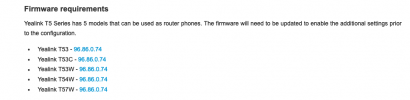
To be honest it is a bit confusing, from the console it says it should be upgraded and the link takes me to the 3CX Yealink T5 Series where the firmware is 96.86.0.74
Screenshot-1.png
 
In the guide you can the the minimum firmware that is required for the ip phone to be provisioned as router phone. In the provided link you can see all the latest 3CX Supported Firmware version.
 
There is an old issue that has returned on this phone. The Firmware is exceeding the available space on the phone to perform the upgrade. This was a problem a few years back that bricked a LOT of phones. Looks like someone did not do the testing before release again (Yealink, not 3CX).

I do not recommend pushing this update. You run a chance of bricking the phone. If you DO NOT need the router capabilities, then leave it alone.

Please 3CX, was is the best course of action here?
 
Unfortunately I already did and I do need the routing. The upgrade went smoothly and for the time being the phone is working
 
  • Like
Reactions: TheodorosG_3CX
There is an old issue that has returned on this phone. The Firmware is exceeding the available space on the phone to perform the upgrade. This was a problem a few years back that bricked a LOT of phones. Looks like someone did not do the testing before release again (Yealink, not 3CX).

I do not recommend pushing this update. You run a chance of bricking the phone. If you DO NOT need the router capabilities, then leave it alone.

Please 3CX, was is the best course of action here?
I sent you a DM so we can check a couple of things
 
I have replied to your DM
 
Ok looks like it was due to having phones running on 96.84.0.xx

Like most cases, you will have to manually upgrade them step by step before you reach the final version.
 
I do not have local access to the phone. Is this an issue?
 
@Noel Evolution On that Yealink page see the "T5X-New-Firmware(Please-read-the-Upgrade-Guide-before-upgrading)" link. That .zip file has a readme PDF and a couple of intermediate firmware versions.

"For devices in firmware version 84 (for example, xx.84.0.125 or 96.84.0.95), you need to upgrade the device firmware to version 96.86.0.18, then to version 96.86.0.23."

Then you can upgrade to a later version.
 
  • Like
Reactions: CentrexJ
Status
Not open for further replies.

Members Online Now

Forum statistics

Threads
111,832
Messages
589,284
Members
164,662
Latest member
DejanMDS