Yealink T54W wrong time due to Daylight Saving Time

Status
Not open for further replies.

bbinz

Premier Customer
Joined
Feb 19, 2020
Messages
22
Reaction score
1
All out Yealink T54W phones go to the wrong time due to the wrong Daylight saving settings in the phone.

Global setting for the time zone is : +4 Dubai.

Phones are configured with use Global timezone.

On the phone, it shows that the timezone is +4, but Daylight saving time is set to Automatic and the time is offset by 1hour, and +4 Dubai there is no daylight time offset.
 
Hi,

Not all phones brands and models will have all the matching timezones your PBX has, but there is a solution.

You can choose a global timezone that is the same as your country and which doesn't observe DST, and one that the phone has available.

For example, if you choose Armenia, you should be able to get the correct time on your phones:
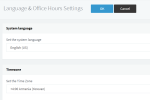
1657713722467.png

After all the services restart (will take 1-2 minutes) you can go ahead and reprovision your phones, and they will display the correct time.
 
Thankyou John,

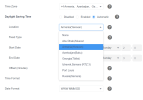
I see on the phone there is option for Abu Dhabi, Muscat. however in the 3cx template no option for the same.
1657714483996.png
 
Do you see that timezone in the Global PBX settings?
 
Do you see that timezone in the Global PBX settings?
In the global I have +4 Dubai, which is the same timezone for AbuDhabi and Muscat
 
It's not matching the one in the phone though, so it will not work in this case and you will be back to square one.

So in this case, try Armenia and let me know if this works for you.
 
  • Like
Reactions: Romain974
Status
Not open for further replies.

Members Online Now

Forum statistics

Threads
111,832
Messages
589,284
Members
164,662
Latest member
DejanMDS