Yealink W60B with two handsets - Issues

Status
Not open for further replies.

jst2

Free User
Joined
Jun 21, 2019
Messages
36
Reaction score
6
I am having some issues with my Yealink W60B:

1. Count of voicemails isn't consistent across handsets. For example, one handset shows 16 messages and the other one shows 0.
2. The first handset can access stored VMs, but the other one doesn't accept the pin.
3. I also can't change the VM pin. Is there a default PIN?
 
Last edited:
sounds like they are set to different extensions.
 
@CentrexJ Thank you for getting back to me and sorry for the slow response, but I had an unexpected hospital visit the other day. I am fine but couldn't respond for a day. Your response has pointed me in the right direction.

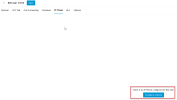
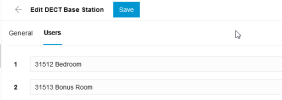
I think I found the root cause for some of my issues. While the system found my base station, and two handsets, I found that the handsets cannot be configured on the user screen. As such, I cannot neither control the voice mailbox nor the PIN (see screenshots). Is that implemented yet?

User configuration.pngUser configuration 2.png
 
When you configure your base station, you set the extension users there and then choose "add dect base station".

You can modify them by going to voice & chat and edit the DECT base station and adjusting the users.
 
Yes, I did that. Sorry, I forgot to include the screenshot for it in my previous response.

DECT Base Station.png
 
So each handset is using a different extension, which has different voicemail boxes and pins. This is to be expected.

Set them both the same user if you want them to be the same. Which might not be possible in startup - I've never tried it.
 
@SweetAction
I can't even assign a voice mailbox or pin to a DECT phone since the tab has no content (see second screenshot in post #3) at the moment...
 
Last edited:
@SweetAction
I can't even assign a voice mailbox or pin to a DECT phone since the tab has no content (see second screenshot in post #3) at the moment...
You have to go to the users tab to change an extension setting. Your screenshot is how you assign the user to a phone.
 
Ok. I have regained access to the shared voice mailbox of the DECT extensions.

I found that my main issue has been that the user id and password for the web client provided in the Welcome email don't work. However, the voicemail PIN does and so I was able to change the PIN using the phone itself.
 
Status
Not open for further replies.

Members Online Now

Forum statistics

Threads
111,831
Messages
589,277
Members
164,660
Latest member
RJenkinsROCK