Yealink W80DM

Status
Not open for further replies.

OBT

Silver Partner
Advanced Certified
Joined
Nov 18, 2021
Messages
30
Reaction score
8
Hi,

I have a an w80 dect system operating with 6 phones and 3 bases, everything is fine except for calls out to external have no audio,

Incoming external is fine, internal calls both ways are fine, just outgoing external

I was using stun server, but also have a vpn to the azure server and its the same if I register through that

I can see in traces a mix of PCMA and PCMU and have tried to set all to PCMA to see if it was the issue.

in the wireshark traces I can see the audio going to the ports and can hear one side but nothing on the handsets,

Has any one come across this before. none of the desk phones have an issue and if I register a sip app to the same extension it is fine

Thanks
 
Have you enabled the option " PXB delivers audio" under options?
 
Yes, I have. strange thing is it calls internal phones on remote sites ok and to the 3cx app on my phone
 
Hello,

If you are using STUN, then you need to make sure that literally all the points have been met:

Failing that, you will face issues sooner or later, even if the phones appear to work fine for a while.

VPN has its own requirements, and we don't really have a guide or provide support on that, other than to tell you that it must make the W80 think that it's on the same LAN network as the PBX machine (ie. L2 VPN).

We recommend you use an SBC, as it tends to be the most reliable, and is the easiest to deploy and maintain. If you are interested I can provide you with additional information, just let me know!
 
Last edited by a moderator:
I have all the ports open on the azure platform, 5060 is locked down to the sip provider and all the sites IP address.

I have desk phones on the same site with no issues and using stun, it is only the dect phones, I have w52p on the other 3 sites on the system and they are not having any issues either.

I can try a SBC, do I ned to delete the w80 to get it to use the SBC?

Just a quick question, If it was the stun, would that not affect calls to other phones and incoming calls?
 
Just a quick question, If it was the stun, would that not affect calls to other phones and incoming calls?
No - because STUN is unpredictable if not deployed as per this guide. It can work on some phones, and fail on others. It can later fail on phones that were working fine too, those are not safe either.

The SBC is a special software we made to bypass all these problems and does not need special firewall config to work. If you want to switch your W80 to SBC mode you will need to:
  • Install an SBC at the office site where the W80 is (on a PC, or a VM or a Raspberry Pi)
  • Change the W80 settings in 3CX to use SBC mode
  • Factory Reset the W80 base and reprovision it again

I can provide you with some assistance if you wish to install an SBC and test it. All your phones at the same site can then be switched to run via the SBC (but they will need to be reset first).
 
Thanks for your help, I have installed it on a test device before and is straight forward, I will try it and let you know

Thanks again
 
  • Like
Reactions: JohnS_3CX
Hi, I have installed the SBC and provisioned the phones to use the SBC, it shows the 6 devices connected through the SBC, but in trunks it shows the sim calls are 0 on the SBC, is this correct?
 
Hi, I just made a call from the cordless phone and it is still no audio om external calls through the SBC
 
Hi, I have installed the SBC and provisioned the phones to use the SBC, it shows the 6 devices connected through the SBC, but in trunks it shows the sim calls are 0 on the SBC, is this correct?
Don't worry about this, it's perfectly normal.

Hi, I just made a call from the cordless phone and it is still no audio om external calls through the SBC

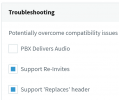
First edit all the extensions used by the W80 and ensure that Options > Troubleshooting looks like this:
1643275139152.png

Just to confirm:

- Very important - did you fully factory reset the W80 and then reprovision it as SBC?
- What firmware version is the W80 currently running? (do not upgrade anything yet please!)
- If you call *777 can you hear your own voice echo?
- When you say external calls have no audio: other side cannot hear you? you cannot hear them? or both?
- What trunk provider are you using?
- What codec settings do you have on the trunk?
- What codec settings do your have on W80 settings under FXS / DECT in your management console?
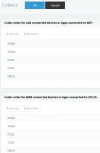
- What codec settings do you have set in your management console under Settings > Codecs?
1643275316507.png


I realise these are a lot of questions, but please try to answer them all, they are important! :)
 
I did not factory default, I just provisioned it, if i factory default I will loose handset registration and the paired dects cells. What I have done is set each dect to register through the SBC IP ( I am doing this remotely at the minute.)

The firmware is 103.83.0.109
Audio on external calls no(both ways), on internal and incoming calls works perfectly
*777, Last time on site I could hear myself blowing in to the mic
PBX delivers audio is on
on the trunks (Virgin) G711a- G711U
on the phones PCMA -PCMU-G722
under settings its PCMU -PCMA-G722-G729


Thanks for your help
 
I can see a call between a desk phone and dect in progress at the moment and showing 1 call on the sbc.
these calls always worked. I have pbx delivers audio on the Virgin trunk and the extensions
 
I understand that it might not be feasible to do it now, so when you have the opportunity you will have to rebuild the W80 array properly. This means:

- Install the latest firmware (version 130.85.0.45)
- You must factory reset the device, simply switching it to SBC and reprovisioning is insufficient!
- Under 3CX Codec Settings, put PCMA on top so it will be the first everywhere
- PBX Delivers Audio should be off when using SBC


Take care when upgrading the firmware: Yealink has now decided to change the way the W80 series works and has created 2 different files: one for the "DM" and one for the "Bases".

In earlier firmware versions, a single unit used to work as DM+Base together, but this is not possible in future firmware revisions. I'm just informing you about this so you are not caught by surprise. The way this works now is that:
  • One device becomes a "DM" (DECT Manager) and is responsible for registration with 3CX and controlling the rest of the bases. It no longer acts as an antenna - it is just a manager device.
  • The rest of the devices become wireless DECT "Bases" which act like signal repeaters for your handsets. You do not configure anything on them. They simply connect to the same LAN as the DM, then the DM sees them and uses them to transmit and receive DECT wireless signals.
This is not a bad thing, but you will have one less antenna in total once your 1st device becomes a DM.
This might not be a problem for you but you should think about whether the remaining 2 bases will be enough to provide signal in your office, or if you will need to buy a 3rd one to cover your area.

If you have more questions about this, I suggest you look up more information via Yealink.


Note: we do not recommend using the older firmware, it may have bugs that cause problems in the future - like now. But meanwhile, if you just stay on the same firmware as now, you might still be able to solve your problem by resetting and reprovisioning. Try this method first before upgrading.

Let me know if you have any questions and I will do my best to help.
 
  • Like
Reactions: OBT
OK, Thanks for the information, I will do that thanks.
 
Hi John, I cant find any firmware higher than 103.83.0.109 on their site, where did you see the 130.85.0.45 version? is that for the w90 version?

thanks for you assistance
 
Hello,

Please follow the instructions here to find it via the 3CX Partner Yealink page
https://www.3cx.com/sip-phones/yealink-dect-w80p/#h.i1ns9ummsm0r

Important note:

- Make sure you install the W80DM-103.83.0.125 file only on one device!
- Make sure you install W80B-103.83.0.125 on the remaining devices
- Once this is done, it cannot be undone! Those devices will permanently become the role you assign them, so if you make a mistake it will not be possible to switch roles again if you change your mind later.


Ignore the 130.85.0.45, it was a typo :)
 
  • Like
Reactions: OBT
Great, Thanks for that
 
Status
Not open for further replies.

Members Online Now

Forum statistics

Threads
111,832
Messages
589,282
Members
164,662
Latest member
DejanMDS