You are already connected to this meeting; you can't connect to the same meeting with the same meeting link twice.

Status
Not open for further replies.

Akhilesh Sharma

Bronze Partner
Basic Certified
Joined
Mar 9, 2022
Messages
12
Reaction score
0
We are on Version 18.0 Update 5 (Build 418) of 3CX Enterprise Perpetual and recently we came across an error end user has been getting which says "You are already connected to this meeting; you can't connect to the same meeting with the same meeting link twice."

The issue is random, and we did notice this happens for those users who are not given the option to enter their name while joining the meeting instead name of the organizer shows automatically while they try to join.

We already came across an old article from 2020: https://www.3cx.com/community/threads/urgent-participant-already-connected.74012/ which says issue was resolved in the latest deployment. But that does not apply to us as we are already on V18.0 Update 5 of the stable version.

Thank You
 
Just a guess, but the "Click on this URL to join the meeting" URL shown in the web client/app is only for the organizer. The URL that is generated in the meeting invite/.ics file is for everyone else.

The organizer needs to use their link (unless "Meeting starts once organizer joins" is unchecked, and they don't care about joining as the meeting organizer).

Everyone else needs to use the other link. Which does not show in the web client.

It would be great if the one in the web client was labeled as such...
 
  • Like
Reactions: D Bedford
Sorry if I was not clear with previous post. Here is what's happening:

1. The meeting link being sent to the users are from the .ics file which is something like this:

Hi,
You have been invited to join the 3CX Video Conference "XXXX" by "XXXXXXXX".
To join from your PC or mobile, click this link:
https://XXXX/meet/ec68b70a26cb4914aa62c9037b9c971b92aac4af

To join by phone, dial:
+XXXXXXXXXXX
and enter this Conference ID:
XXXXXXX

The link in the email works for someone but not all with that error "

You are already connected to this meeting; you can't connect to the same meeting with the same meeting link twice"​

Also, this is random and does not apply to same user. Issue only happens to those who are not provided to enter their name while joining in the meeting.

Thank You
 
Last edited by a moderator:
Are you 100% sure about the link? If I use the organizer link in a private browser tab I'm not prompted for a name but the web page shows my name (3CX ext name) in the window before joining the meeting, underneath the video preview, as it prompts for access to the camera.
 
Okay I am trying one more time to explain it with pictures so that it's clear:

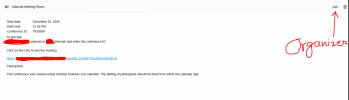
1. Organizer is joining using this option:

3CX_ORG.PNG

2. .ics content is below:

Hi,
You have been invited to join the 3CX Video Conference "Marcela Meeting Room" by "Marcela Hoyos".
To join from your PC or mobile, click this link:
https://fqdn/meet/ec68b70a26cb4914aa62c9037b9c971b92aac4af

To join by phone, dial:
+xxxxxxxxxxx
and enter this Conference ID:
xxxxxxx

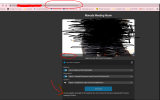
3. User getting error:

3CX_mat.PNG

Pay attention to the last screenshot where meeting link clearly shows the public link so getting that error does not explain why that is happening. Also, this is happeing randomly to random users so we cannot replicate it until it happens with someone.
 
Okay I am trying one more time to explain it with pictures so that it's clear
:) That always helps. I wasn't really trying to question you, apologies if it came across that way.
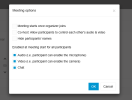
The link change is more of an issue when the organizer clicks the link in their own Outlook popup reminder and thus the meeting organizer never joins so the meeting can't start. If the "Joining info" section said the organizer needed to use the link in 3CX that would help.

Does deleting cookies help? Perhaps 3CX could say what else could cause that error.
 
I am sorry if I came across rude. I always say that when we are reading, we never understand the emotion of the person who wrote it and that is why emojis were made :D

You are correct about Organizer clicking on the Outlook reminder but in this case the meeting is organized with the settings slightly changed so that anyone can join even though Organizer hasn't joined yet. It's setup more like a waiting room.

mee.PNG

I am once again confirming with the person who got the error, because even though his link in the browser says it's public link but we never know if he actually used the public link or by mistake Organizer shared the internal link which was only supposed to be used by Organizer.

After confirmation, I will defiantly try clearing the cookies. I have a case opened with 3CX as well. They have asked about the logs, and I will probably send them what they need in next 24 hours. Let's see what they find.

I will keep this thread updated.

Thank You
 
Hi,
invited people have a personal link, then they cannot join more than once to the same meeting.

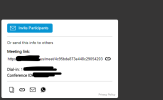
To allow people to join without restrictions you have to share the meeting link (openlink).
It is the one that appears inside the the add participants dialog, during the meeting.

A special mention regards the organizer.
The organizer always has a personal link as invited participants.
If you share the organizer link, than another user will be able to manage the meeting and avoid you to join (don't do that).
For this reason, when the organizer joins from his computer, the url in the bar changes and the meeting link (openlink) is displayed.

From this moment the browser remembers that that link has been used by the organizer from this computer, and it is impossible for him to join twice, also using the meeting link (openlink). If you want to join twice from the same computer, using the meeting link (openlink) you have to open an incognito browser window.

This is how it works.
 
  • Like
Reactions: Evolute IT
I'm on 18.0 Update 6 (Build 908) and having this issue as well.
When a host uses the "Invite Participants" button inside a meeting to send others invites.

1683206247528.png

When some (not all) of the others get those emails, and click the link to join, it says "Joining as HOSTSNAME" and they are unable to join because the host is already joined.
 
Hi,
in your case the link contains the fqdn, then it is correct.
For the participants that are unable to join, can you confirm that the link they are receiving is different from the organizer one?
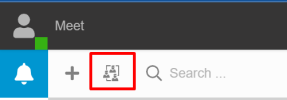
To check the organizer link, please don't look at the url browser bar, but inside the scheduled meetings page of the pbx.
1683207361289.png
Can you try to open the participant link from a incognito window? Do you still have the problem in this case?

Thank you
 
Status
Not open for further replies.

Latest Posts

Forum statistics

Threads
111,973
Messages
590,075
Members
164,895
Latest member
jasonkkrause