• We do not provide troubleshooting help for unsupported phones. Please try with a supported phone.
  • V20 Update 10 Alpha 2 Learn more

Solved You are using Unsupported phones or phones with custom templates which may cause issues.

Status
Not open for further replies.

kenotronix

Silver Partner
Advanced Certified
Joined
May 6, 2021
Messages
3
Reaction score
0
Hello,

I created a copy of the yealink T46G template.

In my custom template, I changed the LABEL of the LineKey keys at the request of my client.

However, the fact of using a custom template, I still have this error in the dashboard.

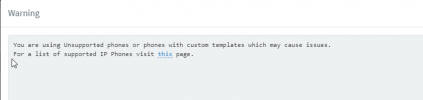
"You are using Unsupported phones or phones with custom templates which may cause issues"

is there a way to remove the error from the dashboard?

Thank you
 
That's not an error. An error would be if that message was displayed and you weren't using custom templates. Since you are using a custom template, that is working as intended.
 
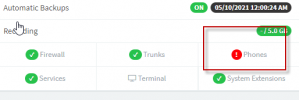
yes, everything is working fine. In my dashboard, I have a red exclamation mark next to phone and when I click on it I have the error/warning message: See below

3cx1.png
3cx2.png

In the phone menu, I see :
3cx3.png

I wanted to know if I can remove the red exclamation mark in the dashboard and don't see the phone in red under the phone section.


Thank you
 
Yes, you can revert back to the stock template.
 
  • Like
Reactions: Evolute IT
So, I understand that using a custom template automatically generates a red exclamation point, because it's not supported by 3CX and there is no option or way to change it.

The only possibility to change the default label of the linekey keys it's to create a custom template.right ?

thank you
 
Or web into the phone manually and change it. As long as you aren't provisioning the button in 3CX it should stick
 
  • Like
Reactions: Evolute IT
Status
Not open for further replies.

Forum statistics

Threads
112,147
Messages
590,959
Members
165,167
Latest member
Finatra.us