Audio dropping during calls

ozydave

Premier Customer
Joined
Jul 22, 2021
Messages
14
Reaction score
2
Hello,
Having problems with call audio.
Calls establish but randomly and intermittently the audio between the two parties goes dead and then comes back.
It is affecting internal, internal to external, external to internal and all extensions.

The 3CX is hosted on Azure and we have an internal SBC. the SIP is from gamma.
Gamma cannot find / see any problem there end.

We are a school that goes through our local authority's firewall. I have been on a call with them and they have live monitored the firewall.
During my call with them there were audio issues but nothing showing on the firewall.

I am on Version 20.0 Update 4 (Build 487 Release) of 3CX

What else can I check?

Thank you
 
  • Like
Reactions: ozydave
Use the 3CX connection monitoring tool, to see which side of the connection is at fault

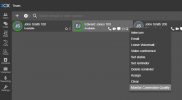
Enable the connection monitoring on a user (top right menu of a user, or from the Team tab

1740752827908.png

This can monitor a connection for a period of 1, 3, 5 or 7 days

See the report of each call.

This is done through the reports, or through the event log

1740752990487.png

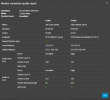
Click on the log entry to expand the report

1740753013039.png

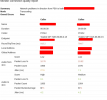
here you will be able to see any packet loss and see the quality of the call and which of the 2 sides is at fault.
 
  • Like
Reactions: ozydave
Thank you, the connection monitor is a handy feature.

This is one of the results, Guess it is not good :-(


3.png
 
Definitely does look like a network issue right there. Test it with a 3CX app on a mobile phone using wifi and 4/5G and see if it is something local within your network or something ISP related.
 
  • Like
Reactions: ozydave
Definitely does look like a network issue right there. Test it with a 3CX app on a mobile phone using wifi and 4/5G and see if it is something local within your network or something ISP related.
Cheers Thats a good call
 
Curious, it says "transcoding" even though they are the same codec...?
 
  • Like
Reactions: ozydave
Curious, it says "transcoding" even though they are the same codec...?
That means the call is going through the PBX. If the call is going from one device to another without the audio going through the PBX, then this would show as a bypass call.
 
Curious, it says "transcoding" even though they are the same codec...?
I am not brilliant with this. I would not know where or why the trans coding happens
 
That means the call is going through the PBX. If the call is going from one device to another without the audio going through the PBX, then this would show as a bypass call.
Hmm, OK, from PWA to app it shows as "Proxy." So it's more the connection type than the codecs.

With an SBC shouldn't OP's call not go through 3CX? Unless it was being recorded I suppose...

Interesting the "live monitoring" of the firewall didn't notice 10% packet loss...I'd think everyone would notice that. Maybe it's only the connection to the 3CX server...or worse, internal. In which case I'd think everyone would notice that.
 
So 3CX app to 3CX app installed on mobiles, call quality is good.
3CX on mobile to an internal line then the audio drops.
Assumptions, I have to think its the local authority's firewall, nothing has changed on my internal network. :-(

Of course they say its nothing to do with them. The local authority are the root cause of most of my problems.

Thanks for you help
 
  • Like
Reactions: NicholasP_3CX
At least now you have data to backup your claim that it is their fault. Ask them for theirs.
 
  • Like
Reactions: ozydave
At least now you have data to backup your claim that it is their fault. Ask them for theirs.
They are just so bad, no coms from them for two days now. I've sent pcap files screen grabs etc. They are just the worst to deal with
 
My SBC is version 18.1.36 (windows)
Are there any logs on the SBC that could help ID the problem
 
Cheers thank you
 

Latest Posts

Forum statistics

Threads
111,964
Messages
590,000
Members
164,869
Latest member
hpgitsupport