Unsupported Assistance with Connecting HikVision Intercom and 3CX System

Status
Not open for further replies.

mladen_indas

Customer
Basic Certified
Joined
Jan 23, 2024
Messages
5
Reaction score
2
Dear Sir/Madam,

I kindly ask for your assistance. I am working on connecting a HikVision intercom with a 3CX PBX system. I have successfully established the connection, and audio communication is functioning between the intercom and a Yealink phone.

Is it possible to also transmit video? If so, which Yealink phone model would you recommend for this purpose?

Additionally, I would like to know if it is possible to see the video feed on the 3CX Android application when someone rings the intercom?

The intercom model is HikVision DS-KB8113-IMEI1(B).

Thank you in advance for your support.

Best regards,
Mladen Popovic
 
Hi,
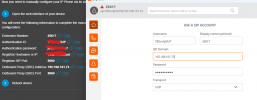
From the extension you are going to assign to the door phone, add an IP phone(i uses a Yealink t41) and use the information like follow:
1748616148182.png

Hope it helps

Regrads.
 
Hi, setting up as a test 3CX free, am i correct the free edition doesnt allow SIP on port 5060 ? can i connect an hikvision to 3cx free?
 
not direct without a 3CX SBC or a router phone
ok, gonna try that SBC, but that beats the purpose of a cloud system again ? is that the only way ?


thnx
 
ok, gonna try that SBC, but that beats the purpose of a cloud system again ? is that the only way ?


thnx
Thats the only way.
 
Thats the only way.
ok, i tried with a linphone, it works
for sip address i used: "xxx" <sip:[email protected]>
in liphone , i enabled route : <sip:192.168.161.73;transport=udp>

and connected ...

But as you can see in this thread, second post, hikvision settings, there is no route option? i can only fill in a "server address" ? how to proceed with that ?
 
ok, i tried with a linphone, it works
for sip address i used: "xxx" <sip:[email protected]>
in liphone , i enabled route : <sip:192.168.161.73;transport=udp>

and connected ...

But as you can see in this thread, second post, hikvision settings, there is no route option? i can only fill in a "server address" ? how to proceed with that ?
Buy a license.
 
how do you mean? what can i do more then? the purpose was using the free edition with max 10 users
 
how do you mean? what can i do more then? the purpose was using the free edition with max 10 users
You want to use STUN. Free doesnt offer it, paid is capable of it.

Buy 3CX Pro.
 
  • Like
Reactions: Evolute IT
hmm, cant believe there is no other way to connect an intercom with the free edition , even with an SBC running
 
i tought you can connect to the SBC direcly, but seems its somekind of a proxy instead
 
SBC is your proxy to the PBX.

The Hikvision doesnt look capable of using a proxy.
 
  • Like
Reactions: Evolute IT
SBC is your proxy to the PBX.

The Hikvision doesnt look capable of using a proxy.
When this is the case, the SIP Server/Register Server becomes the SBC IP, instead of the PBX.
 
hmm, so it should work? hmm, tried it with a linphone, but i was unable to register at all , didnt see anything coming in , no event ...
 
did it like below, is that correct then ? i see then error:

2025-12-18 14:16:17:357 [/liblinphone] MESSAGE Looking up for an account matching Address("25617" <sip:[email protected]>) ended up finding Account [000001AB41862900] ("25617" <sip:[email protected]>)
2025-12-18 14:16:17:357 [/belle-sip] ERROR No listening point matching for [udp://192.168.161.73:5060]

dont see any event coming in in 3cx

1766063706333.png
 
Try using the extension number as username.
 
the same error, and no event at all

i can only register using 3cx as server and the IP of the SBC as proxy

2025-12-18 14:21:34:075 [/liblinphone] MESSAGE Account [000001AB4B3FA700] ("25617" <sip:[email protected]>) about to register (LinphoneCore version: 5.4.38)
2025-12-18 14:21:34:075 [/liblinphone] MESSAGE Looking up for an account matching Address("25617" <sip:[email protected]>) ended up finding Account [000001AB4B3FA700] ("25617" <sip:[email protected]>)
2025-12-18 14:21:34:075 [/belle-sip] ERROR No listening point matching for [udp://192.168.161.73:5060]
 
Try using 192.168.161.73:5060 as address
 
that makes no difference :-(
 
Status
Not open for further replies.

Members Online Now

Forum statistics

Threads
111,831
Messages
589,277
Members
164,660
Latest member
RJenkinsROCK