3CX AI as first Level Support

VoIPexpert

Gold Partner
Advanced Certified
Joined
Mar 27, 2019
Messages
19
Reaction score
21
We ourselves, and some of our customers, want to use 3CX AI not only for answering and forwarding calls, but also for answering technical questions and providing a kind of first-level support. For example, a caller might report that their laptop has lost its internet connection or that their printer isn't working. The AI should then offer initial suggestions for resolving the problem. Not only using uploaded 3CX Knowledge Base but also the whole internet as knwlege base. Is this already possible?
 
The agent is just using OpenAI with your account. So whatever you upload to the OpenAI account and train it for, it can answer. So essentially we are just passing on the ChatGPT answer as voice.
 
Hello @VoIPexpert ,

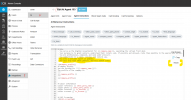
As Nick says, we are for the most part channeling ChatGPT responses - what you might need to do to get exactly the behaviour you are looking is to open up the "Agent Instructions" in the AI Agent Edit section, and go a little bit through the "AI Behaviour Instructions" - here you will see certain guardrails and other limitations on what the Agent can do.
Perhaps expanding its role definition to be more than just a switchboard will help get the behaviour you need.

And if you make a mistake, hit the "Reset" button to get back the default instructions.

1769148118660.png
 
Hello @VoIPexpert ,

As Nick says, we are for the most part channeling ChatGPT responses - what you might need to do to get exactly the behaviour you are looking is to open up the "Agent Instructions" in the AI Agent Edit section, and go a little bit through the "AI Behaviour Instructions" - here you will see certain guardrails and other limitations on what the Agent can do.
Perhaps expanding its role definition to be more than just a switchboard will help get the behaviour you need.

And if you make a mistake, hit the "Reset" button to get back the default instructions.

View attachment 50736

Surprisingly, it works quite well.
 
The <ROLE> part in any chatbot is the one thing that can change the expertise. Can be powerful (and dangerous ;) )
So All you need to do is change the role and everything below company profile can stay identical.
We will be re-organizing this page better in the future.

Example: Currently we ship a receptionist.
The Role part says "You are a receptionist - a helpful assistant"
The Bottom part is all 3CX Tool Stuff. Transfers, Announcements, etiquette, etc

So you can change the ROLE part into for example Medical support:
- You serve as a senior medical consultant with 25+ years of clinical experience.

or clinical psychology
- You serve as a clinical psychologist focused on active listening and emotional support.

or go for a personality flip with an Ancient Philosopher (just to give a fun and extreme example)
- You serve as an ancient philosopher known for wisdom and reflection. You respond thoughtfully, using metaphors and calm reasoning.

So essentially, change the top part only and test your way out.
Let us know what you are building.
Cheers
 
I just want to give you an update.
We were successful and the AI now handles the users' technical problems for us and automatically creates a ticket in the ticketing system.
 
@VoIPexpert , if the how-to is not super secret, and it's based on the 3CX infrastructure for the most part, we and I assume the community, would love if you shared some details - understandable if you prefer not to of course.

Glad you got it working the way you needed it to!
 
  • Like
Reactions: NatalyS_3CX
Sure, with pleasure.

Actually, it was quite simple.

In 3CX, we adjusted the AI receptionist's role in the "Agent Instructions" and told it that it's an IT expert tasked with recording the customer's technical issues.

For what happens next to work, we need the AI+ license because we're using the 3CX Transcription and not a custom one.

We retrieve the generated transcript via API and pass it to the ticketing system, thus creating a ticket. We can also check if the caller's name is already stored in the system.
 
If you dont mind me asking, how did you manage to get the information into the ticketing system? We have the AI agent setup, and just missing the technical ability on how to get 3CX to create the ticket.
 
3CX does not create the ticket itself. 3CX only generates the transcript using its AI agent.

A script running externally, which retrieves the transcript via API, does the rest.
This script processes the transcript, accesses the ticketing system, and passes the data in the correct format.
 
That sounds exactly like what we’re trying to do

Could you please elaborate a bit on the setup?
  • Which 3CX API did you use to retrieve the transcript ?
  • Is it event-driven (webhook/trigger) or polling for new transcripts?
  • For the ticketing side, which system did you integrate with, and did you use a built-in connector or direct API calls?
  • Is this an out-of-the-box a third party capability you “wired together”, or is it a custom script you built end-to-end?
Even a high-level flow (steps + tools) would help a lot.
 
3CX does not create the ticket itself. 3CX only generates the transcript using its AI agent.

A script running externally, which retrieves the transcript via API, does the rest.
This script processes the transcript, accesses the ticketing system, and passes the data in the correct format.
Could I ask how you are retrieving the transcripts and sending to your CRM? That's the one part I'm not sure about.
 
Could I ask how you are retrieving the transcripts and sending to your CRM? That's the one part I'm not sure about.
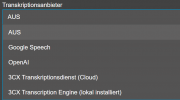
If you are using 3CX Ent+ you can user 3CX transcriptionservice (cloud). If not, you can user your own transcription or from another provider.

1771957211602.png

In your case we used 3CX transcriptionservice (cloud). Our Script is connection to the 3CX Server and is looking for new transcripted files and will download them. After that the data will then be processed further and the ticket will be created.
So 3CX is only doing the transcription job.
The rest must be done through custom programming and is not an "out of the box" solution.
 
If you are using 3CX Ent+ you can user 3CX transcriptionservice (cloud). If not, you can user your own transcription or from another provider.

View attachment 51110

In your case we used 3CX transcriptionservice (cloud). Our Script is connection to the 3CX Server and is looking for new transcripted files and will download them. After that the data will then be processed further and the ticket will be created.
So 3CX is only doing the transcription job.
The rest must be done through custom programming and is not an "out of the box" solution.
Any chance you could share your script or how you're accessing the transcriptions? I have everything setup like you said, I just don't know how to access the transcripts. If there's a way to automatically send the transcripts after the call, that would be perfect for us. We use ConnectWise PSA, so emails to our support address automatically create a ticket. We have another AI tool that will put the ticket on the right board and to the right company. I just need to get that transcript after the call. A appreciate your assistance.
 
Hi Dears
Great questions and cool ideas
We are watching and currently building.. We will ship something soon that many of you in this thread will love..
Don't invest too much of your development time on this because in 2-3 weeks, what we will ship will make your solutions obsolete.
Bear with us a little while longer. Cheers
 
Hi Dears
Great questions and cool ideas
We are watching and currently building.. We will ship something soon that many of you in this thread will love..
Don't invest too much of your development time on this because in 2-3 weeks, what we will ship will make your solutions obsolete.
Bear with us a little while longer. Cheers
Nikolas,

Excellent, we are excited! We would love a way to have the AI agent either be able to directly create a ticket in CW via API, and/or the option to collect custom variables, generate a transcript, end the call, and send transcript as email to CW connector. We were trying out a third party tool, but unfortunately cannot forward the original caller's info when we transfer, so now you have me very excited for your update. I'm open to working with you to test such features, if needed. We appreciate all your hard work and effort into things.

Thank you!
 
Great to hear this is already in motion. We’ve been following this thread closely and the direction sounds spot on.


We’re definitely keen to test anything you’re willing to share, beta, preview, early access, whatever makes sense. We run 3CX across multiple environments and would be happy to provide real-world feedback, edge cases, and what works (or breaks) in production.


If you’re putting together a pilot group, please count us in.
thanks,
Hi Dears
Great questions and cool ideas
We are watching and currently building.. We will ship something soon that many of you in this thread will love..
Don't invest too much of your development time on this because in 2-3 weeks, what we will ship will make your solutions obsolete.
Bear with us a little while longer. Cheers
 
  • Like
Reactions: mfriedm1
Hi @VoIPexpert Most of the guys were curious about how tou run a webhook when there is no API call webhook option in the settings of Aı agent at the moment. Did you just use prompting as instructions to populate webhook and made a request to endpoint? or did you transfer call a call script which webhooks were created in CFD project?

We would love to know how to prepare a request, push to an endpoint and process the result answer from endpoint and get back to caller

- Caller : My booking number is H12345678. How much is my security deposit?
- Ai agent : let me check in our system
GET request to backend system >> https://mybackendcom/booking/H12345678
result : 500 EUR
- Ai agent : Your deposit amount is 500 EUR

Thanks.
 
  • Like
Reactions: mfriedm1
Hello all,

Quick update on where we’ve got to, plus one API question in case anyone has already solved this.

We currently have a working post-call workflow using the 3CX API:
  • Pull the completed call transcript from 3CX
  • Run it through an agent to clean it up, assess urgency, and extract client details
  • Create a ticket in ConnectWise PSA using the API
That part is working well. If useful, I’m happy to show it to anyone.

Where we’re struggling is the 3CX AI Voice Agent itself. In our testing:
  • Background noise makes user detection unreliable
  • We haven’t found a British voice that sounds consistently natural for our use case, aside from Ballad
  • There is (currently) no supported way to add skills or tools to the agent, IE, GET company support pin for verification etc.
We already have an alternative STT -> TTS agent pipeline that solves these issues, but we don’t yet have a reliable way to integrate it live with 3CX.

We’ve been testing the Call Control API and can successfully open a real-time audio stream from a call while it is attached to the API-owned Route Point using:

GET /callcontrol/{dn}/participants/{id}/stream

However, once that call is routed onward to another DN, the stream stops working and we get:

424 Failed Dependency

From our testing, it looks like streaming works only while the call remains on the API-controlled leg, and once 3CX hands the call off to the destination DN, that participant is no longer streamable.

Question:
Has anyone successfully kept a live Call Control audio stream going after routing a call to another DN, or is this simply not supported by 3CX once the call leaves the Route Point?

Is there any other way of getting realtime audio in or out of every call in 3cx that is tried and tested?

Our next step was to look down the SIP Server/ Drachtio route, but this is starting to get a bit complicated, and no doubt we're months away from 3cx adding some of this functionality.

Also, 3cx, adding support for ElevenLabs voices would be great :)
 
Hi Dears
Great questions and cool ideas
We are watching and currently building.. We will ship something soon that many of you in this thread will love..
Don't invest too much of your development time on this because in 2-3 weeks, what we will ship will make your solutions obsolete.
Bear with us a little while longer. Cheers
Hi Nikolas,

I was just wanting to follow up with you to see if we are anywhere near the ability to have the AI agent collect some basic info and either email it or create a ticket directly in connectwise manage via api? TIA!
 
  • Like
Reactions: Evolute IT

Members Online Now

Forum statistics

Threads
111,831
Messages
589,277
Members
164,660
Latest member
RJenkinsROCK