Solved 3CX Failover – Archive Setup & Storage Issue

Status
Not open for further replies.

ACL

Gold Partner
Advanced Certified
Joined
Sep 5, 2024
Messages
58
Reaction score
4
Hi Experts,

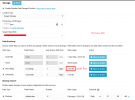
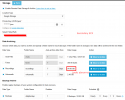
We would like to seek clarification regarding our 3CX failover setup in AWS. We have configured a remote archive storage on Google Cloud to store recordings, voicemails, and backups.

Could you please advise whether the remote archive storage needs to be configured on both the primary and secondary 3CX instances, or if configuring it on the primary instance alone is sufficient?

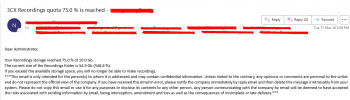
We are currently receiving alerts indicating that the 3CX recording quota has reached 75%. Upon checking:
  • The primary 3CX does not show any storage issues
  • The secondary 3CX has accumulated over 50GB of recordings
We would appreciate your guidance on how best to proceed with this setup and resolve the storage discrepancy.

Thank you in advance.

1773729108039.png
1773729256517.png
1773729355464.png
 
There are a couple of issues I am concerned about regarding HA setup. For example, if phone calls take place on the secondary server, what happens to the Grafana export? It seems to me that you will need to export from both servers.

I suspect that the same is true for backing up recordings and voicemails. My suggestion is that you take a close look at the AWS file gateway. Create one shared folder accessible by both servers and have them archive through the gateway. The bonus is that the gateway will automatically migrate the files from on-line > near-line > glacier automatically reducing the storage cost to almost nothing. If both servers are archiving to the same place, then nothing needs to be done with these files when you revert back to the primary.

My assumption is that you would need to setup the recording storage on both servers.
 
  • Like
Reactions: ACL
Could any 3CX staff members assist on the queries please?
 
Hi, we have seen the thread and I will see if we have some feedback we can provide.
 
Hi @ACL , please open a ticket with support so they can investigate and advice accordingly.
 
I believe we figured out this issue - we had the same thing happening on a bunch of our systems.

For each system we have we have a Production and DR system setup with daily backup and restore.
Each system as remote archiving setup.
Archiving for Recordings is set to 1 day.
What we see happening is the Production is working properly, and it is archiving all recordings after 1 day.
We see that daily backup and restore keeps adding local files yet to be archived from the Production to DR each day and causing orphaned files daily on the DR. The DR local recordings just keep growing and growing.

The fix is to switch recording archiving to Zero Days, so the daily backup and restore stops adding files to the DR that have yet to be archived.

We then manually removed all of the orphaned local disk files from the DR systems

Issue resolved.
 
  • Like
Reactions: KyriacosS_3CX
Status
Not open for further replies.

Members Online Now

No members online now.

Forum statistics

Threads
111,832
Messages
589,285
Members
164,662
Latest member
DejanMDS