- Joined
- May 27, 2026
- Messages
- 3
- Reaction score
- 0
Hello,
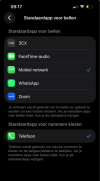
We are experiencing a unique issue with one of our clients using the 3CX iOS app, where regular iOS FaceTime calls are somehow attempting to route via the 3CX network/number. Additionally, the user is experiencing a total loss of audio when trying to answer incoming calls via the 3CX app.
What we have already tried:
We are experiencing a unique issue with one of our clients using the 3CX iOS app, where regular iOS FaceTime calls are somehow attempting to route via the 3CX network/number. Additionally, the user is experiencing a total loss of audio when trying to answer incoming calls via the 3CX app.
What we have already tried:
- Verified the iOS FaceTime settings (Settings > FaceTime). Checked the "You can be reached by FaceTime at" and "Start new calls from" sections to ensure only the user's private mobile number or Apple ID email is selected (not the 3CX number/extension).
- Verified the default voice line (Settings > Mobile Data > Default Voice Line) is set to Primary (the private SIM card) and not the business/3CX line.
- Disabled the "Integrate with Device Recents" setting within the 3CX app to see if it would stop the interference with FaceTime, but the issue persists.
- The user reports that everything appears to be configured correctly on the device, but incoming 3CX calls still have no audio, and FaceTime remains broken.