- Joined
- Sep 19, 2025
- Messages
- 1
- Reaction score
- 0
Transferring a Parked Caller to a Specific Extension's Voicemail from a Call Flow
Environment: 3CX V20 (Linux), Professional Annual, 8 SC. Roughly 38 extensions need this feature.
What I'm building
A call-screening / "announce caller" feature for when the receptionist is unavailable. A caller who reaches an attorney is asked to say their name; the attorney's phone then rings and announces "You have a call from [name] — press 1 to accept, or 2 to send to voicemail." Press 1 connects them; press 2 should send the caller to that attorney's voicemail.
I built this with the Call Flow Designer rather than the built-in Announce Caller (Rebound) feature, because Rebound requires a dummy extension per user, and 38 dummies would blow past the fair-use extension cap on 8 SC.
Current architecture (the parts that work)
Two CFD apps that hand off to each other:
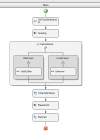
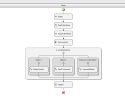
- Screening app (runs on the inbound caller's leg): greets the caller, captures the spoken name via Google STT, writes the name to a text file keyed by the target attorney's extension, then parks the caller (Transfer to *09). Its Disconnect Handler then issues a Make Call with origin = the attorney's extension and destination = the announce app.
- Announce app(runs on the attorney's leg): reads the name file, announces it via TTS, and presents an Accept/Decline menu.
- Press 1 → Transfer to *19 (pulls the caller out of parking) → the two are bridged. This works perfectly.
- Press 2 → intended to send the caller to the attorney's voicemail.
(Two separate CFD projects can't share variables, so the caller's name is passed via a text file named by the attorney's extension. That part works fine.)
The problem
Pressing 2 doesn't do what I need. Because the announce app runs on the attorney's call leg, its Transfer (attorneyExt + "Transfer to Extension Voicemail") moves the attorney into the attorney's own mailbox — while the caller stays parked. What I actually need is for the parked caller to be dropped into that attorney's voicemail.
What I've already found
From older forum threads, it appears an IVR/CFD cannot control a shared parking space, and the only native lever is the parking-orbit timeout destination. I'm not sure that's still true in V20 U9, and a single global timeout destination doesn't give me a per-attorney mailbox anyway. Other threads suggest it "should be possible with the Call Control API." So I'm trying to choose the best path and would appreciate guidance on either.
Path A — Shared Parking / CFD only
- In V20 (U9), is there any CFD-native way to send a specific parked call to a specific extension's voicemail, triggered by the answering party pressing a key? (Older threads say no — is that still the case?)
- If the parking-orbit timeout destination is the only native option, can it be made per-extension/per-attorney, or is it a single destination per orbit?
- Is there a supported alternative topology that avoids this trap — e.g., keeping call control on the caller's leg (no parking), so one flow can both announce to the attorney and, on decline, transfer the caller to the attorney's mailbox? If so, how do you announce to the called party and capture their DTMF while still retaining control of the caller's leg in CFD?
Path B — Call Control API
- With the V20 Call Control API, what's the correct method/overload to transfer an active call (by call ID) directly to a specific extension's voicemail — i.e., land in the mailbox, not just ring the extension?
- Given community reports that parking and retrieving parked calls via the API is unreliable, is the recommended design to have an API app own both legs (answer the attorney, play the prompt, capture the 1/2, then either bridge or send the caller to voicemail) and skip shared parking entirely?
- The .NET assembly API needs an on-box agent. Is the REST API (ccapi) mature enough as of U9 to do this end-to-end, and can it run externally (off the PBX)?
- Are there OMSamples or community examples close to this "screen → announce → accept / decline-to-voicemail" pattern I could start from?
Bottom line
For a ~38-user production deployment (reliability matters, no in-house dev team), which approach would you recommend? Is a custom Call Control service overkill for this one feature, or is there a cleaner native pattern I'm missing?
I've attached a couple of screenshots detailing the call flows. Happy to share a sanitized export or screenshots of the flows if that helps. Thanks in advance.