Assistance Needed – Caller ID Issue When Forwarding Calls to Mobile (v20)

Rajan638

Silver Partner
Basic Certified
Joined
Jul 16, 2025
Messages
14
Reaction score
2
Hi All,


I’m encountering an issue with call forwarding to mobile numbers. Currently, when a call is forwarded, the caller ID displayed on the mobile shows the SIP trunk number instead of the original caller’s number.


This was working as expected on version 18, where the original caller ID would be preserved. I’m familiar with the relevant settings in v18, but in version 20, I’m unable to locate the same options or achieve the desired behavior. I’ve tried all available SIP trunk configuration options, but none seem to resolve the issue.


If anyone has experience with this in v20 or can provide guidance, your help would be greatly appreciated.


Best regards,
 
Hello @Rajan638,

Please note that achieving this may require some changes to the outbound parameter although these changes are VoIP provider-specific and if your VoIP provider allows you to send any other caller id than the one assigned to you.
It would be best to contact your VoIP provider and ask them if they allow this (Clip no screening) and ask them in what SIP field they expect this information from

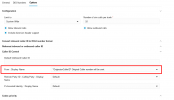
If the change should be made in the From: Display Name then you can navigate to Admin > Voice & Chat > edit your provider > Options > Caller ID Control.

1753709884168.png


Otherwise you can export the template, make the appropriate changes to the SIP Field advised from your provider and then import the template to recreate the SIP Trunk.
To export the template navigate to Admin > Voice & Chat > click on the three dots menu > export
To import the template navigate to Admin > Advanced > Templates > Provider Templates.
 
Hi Dimitris,

Thank you for your assistance.

To clarify, we are also the provider and are using our own SIP trunk. For reference, call forwarding via our SIP trunk is working correctly on version 18.

I followed your suggested steps (Admin > Voice & Chat > Edit your provider > Options > Caller ID Control), but unfortunately, the issue persists.


I also exported the configuration of the SIP trunk from the working system, imported and compared it with the current one— but with no success.

Could you please advise on any additional settings or areas I should investigate further?

Thank you
Rajan
 
HI DimitrisL_3CX
If you could help here please?

Thanks Rajan

 
This depends on the SIP Field you are expecting this information.
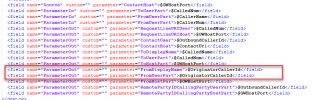
In most cases, you will have to change the FromUserPart to show "OriginatorCallerID"
In your case, which is the SIP Field you expect this information to be in?
 
Hi @DimitrisL_3CX

I have changed to ''OriginatorcallerId'' on both field,

1753885298060.png

Doesn't work.

Just in case,

Same File if I import in working PBX it works.

Is there anything else on PBX setting to change also?

Thanks
Rajan
 

Attachments

  • 1753885162215.png
    1753885162215.png
    6.7 KB · Views: 12
  • 1753885266157.png
    1753885266157.png
    6.7 KB · Views: 9
  • 1753885276091.png
    1753885276091.png
    6.7 KB · Views: 7
HI

JohnS_3CX

If you could please put your word on this also please if possible?

Thanks
Raj

 
There is no other option in the PBX for the OriginatorCallerID. You may start a packet capture and see if the PBX sends the correct information to your provider. If the correct information is sent from the PBX side, then I would suggest contacting your SIP Trunk provider to check this also with them.
Alternatively, you can open a ticket to our support and provide us with the Support info files in Verbose and the capture to check this.
 
Hi @DimitrisL_3CX

As i mention above, we are provider too, The same SIP trunk work on other v20 PBX, with same export file of sip trunk. Not sure where is the issue now?

Thanks
Rajan
 
Do you have different Outbound rules or something else that sets a hard value to the outgoing leg?
 
Has this been resolved? I have the same issue - trying to get the original caller ID to be passed through when forwarded
 
What type of forwarding is the extension using? I know that in the past, the caller ID sent would differ depending on the type being used. That may have changed in recent versions since no one else has asked this..

You also say "Call forwarding to mobile numbers", Does the issue also exist if you call forward to a landline? I assume it does, but always nice to confirm.
 
Has this issue been resolved? I have the same issue.
 
Capture the SIP signaling traffic being sent to the trunk provider.

If the information is present, then your next question should be directed to your trunk provider. If the information is NOT present, then you have a configuration issue with your trunk template.
 
The issue is that the phonenumber of the original caller is added as a name, but the uri is not changed.
This is the INVITE coming from 3CX (phone numbers and ip addresses have been redacted for privacy reasons).

In this example, +32474654321 is the number of the original caller, +3257987654 is the number that is called, and +32474123456 is the number that the call is forwarded to.

INVITE sip:+32474123456@10.255.x.x:5060 SIP/2.0
Via: SIP/2.0/UDP 10.11.x.x:5060;branch=z9hG4bK-524287-1---06799d1f162b8a50;rport
Max-Forwards: 70
Contact: <sip:+3257987654@10.11.x.x:5060>
To: <sip:+32474123456@10.255.x.x:5060>
From: "+32474654321"<sip:+3257987654@10.255.x.x:5060>;tag=d294e826
Call-ID: Z1wajiukG4aOW9Zym-lhJQ..
CSeq: 1 INVITE
Allow: INVITE, ACK, CANCEL, OPTIONS, BYE, REGISTER, SUBSCRIBE, NOTIFY, REFER, INFO, MESSAGE, UPDATE
Content-Type: application/sdp
Supported: replaces, timer
User-Agent: 3CXPhoneSystem 20.0.9.995 (995)
P-Asserted-Identity: "+32474654321"<sip:anonymous>
Remote-Party-ID: "+32474654321"<sip:+3257987654@10.255.x.x:5060>;party=calling
Diversion: <sip:+3257987654@3cx-fqdn.be:5060>;privacy=off;reason=unconditional;counter=1
Content-Length: 290

Since the Diversion header contains the number that is doing the forwarding, this number should not be present in any other header.
 
@DidierDE number +3257987654 is in the Diversion Header because this is the originally dialler number.
Call a DID and this is what you will see there.
Now number +3257987654 is in the Remote Party ID User Part and the From User Part as this is what the template has.
You may change these settings on what you want and then try again.
Check here : https://www.3cx.com/docs/voip-provider-template-builder/
 
Changing the template did indeed do the trick. Thanks for your assistance!
 
  • Like
Reactions: KyriacosS_3CX

Members Online Now

Forum statistics

Threads
111,832
Messages
589,283
Members
164,662
Latest member
DejanMDS