3CX App Desktop Problems reported by users with the new update

Alle CTEC

Silver Partner
Advanced Certified
Joined
Sep 11, 2023
Messages
356
Reaction score
44
I have received some reports following update 9. Users with the 3CX Desktop application disappear from the Team if they turn off their computer. For example, if I log out, turn off my computer, and disappear from the Team because I'm not a registered user. Furthermore, if I want to transfer a call from the desktop application, then I press Transfer, go to the phonebook or Teams to select the desired contact, the client makes a new call without offering the option to complete the transfer. It only works if I press Transfer and then either select a BLF key or directly type the name or number of the person to whom I want to transfer the call. If I activate a transfer, then I press Transfer, type the name of the person to whom I want to transfer the call, and the user is busy, I can't cancel the transfer unless I click on another user at random and cancel the call.
 
Hi @Alle CTEC
Can you please confirm which 3CX Desktop App version you are using?
Also, could you provide the exact steps to reproduce the issue and, if possible, screenshots from the Desktop App?
 
@Alle CTEC
"Users with the 3CX Desktop application disappear from the Team if they turn off their computer. For example, if I log out, turn off my computer, and disappear from the Team because I'm not a registered user."

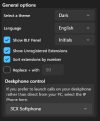
Looks like client Settings/"Show Unregistered Extensions" being turned OFF.

1783617512277.png
 
  • Like
Reactions: Alle CTEC
Hi @Alle CTEC
Can you please confirm which 3CX Desktop App version you are using?
Also, could you provide the exact steps to reproduce the issue and, if possible, screenshots from the Desktop App?
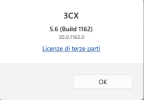
Version
1783666349595.png
 
Hi @Alle CTEC
Can you please confirm which 3CX Desktop App version you are using?
Also, could you provide the exact steps to reproduce the issue and, if possible, screenshots from the Desktop App?
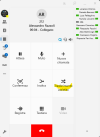
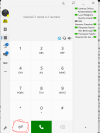
Hi, I've attached the screenshots so if you're on a call, press assisted transfer ok

Trasf01.png

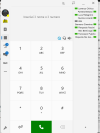
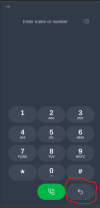
Now if instead of using the BLF buttons you click on Team or Contacts and select the user to whom you want to transfer the call
Trasf02.png

At this point you find yourself with two calls without the possibility of joining the interlocutors

I would also like to point out that if you activate a transfer by mistake or when searching for the user you see that he is absent, you have no way to interrupt it unless you simulate a transfer to another user.
 
Currently the way to perform blind or attended transfer is to click on the button, and click on BLF or search for the contact/extension in the transfer page within the dialer.

Transfer > go to Team or Contacts and call from there was never a behaviour that the Softphone was capable of
 
Currently the way to perform blind or attended transfer is to click on the button, and click on BLF or search for the contact/extension in the transfer page within the dialer.

Transfer > go to Team or Contacts and call from there was never a behaviour that the Softphone was capable of
Ok but if you click on transfer then type the number or search for the person to whom you want to transfer the call and this person is absent or not registered you have no way to interrupt the transfer except simulating a fake one so I click on a free extension at random and then interrupt the transfer
 
Ok but if you click on transfer then type the number or search for the person to whom you want to transfer the call and this person is absent or not registered you have no way to interrupt the transfer except simulating a fake one so I click on a free extension at random and then interrupt the transfer
You can also see the extension status in the search.
 
You can also see the extension status in the search.
if you click transfer and search for the person and they are absent or not registered, how do you get back to the call?
 
if you click transfer and search for the person and they are absent or not registered, how do you get back to the call?
With a Blind Transfer, the call is transferred immediately to the selected destination. If the destination is busy, the call can be redirected back to the user who initiated the transfer, provided the appropriate forwarding rule is configured.

However, if the destination is unregistered, does not answer, or is otherwise unavailable, the call will follow the destination user's configured forwarding rules. It cannot be retrieved by the user who initiated the blind transfer.

If you need to check whether the destination is available and willing to take the call before completing the transfer, you should use an Attended Transfer instead. This allows you to speak to the destination first and complete the transfer only if they can accept the call.
 
  • Like
Reactions: bitn2 and Vali_3CX
With a Blind Transfer, the call is transferred immediately to the selected destination. If the destination is busy, the call can be redirected back to the user who initiated the transfer, provided the appropriate forwarding rule is configured.

However, if the destination is unregistered, does not answer, or is otherwise unavailable, the call will follow the destination user's configured forwarding rules. It cannot be retrieved by the user who initiated the blind transfer.

If you need to check whether the destination is available and willing to take the call before completing the transfer, you should use an Attended Transfer instead. This allows you to speak to the destination first and complete the transfer only if they can accept the call.
What you say is correct but my question is another if you press the transfer button and therefore activate the transfer let's say you made a mistake how do you cancel the operation?
 
What you say is correct but my question is another if you press the transfer button and therefore activate the transfer let's say you made a mistake how do you cancel the operation?
Once a blind transfer is initiated and the transferee is unavailable, other than being busy (which can be controlled), the call will be routed to whichever destination is set under that extension's forwarding rules. There is no way to retrieve it.
 
  • Like
Reactions: bitn2
Once a blind transfer is initiated and the transferee is unavailable, other than being busy (which can be controlled), the call will be routed to whichever destination is set under that extension's forwarding rules. There is no way to retrieve it.
Whether it's a blind or assisted transfer, if you press the transfer button by mistake, how do you cancel the transfer without entering any number?
 

Members Online Now

Forum statistics

Threads
111,831
Messages
589,277
Members
164,660
Latest member
RJenkinsROCK