3rd party phones / softphones integration 3cx v20

mj86

Trial User
Joined
Jul 28, 2010
Messages
7
Reaction score
0
why are it impossible to register 3rd party softphones this days?
in old versions it was easy
i enter the correct extension number and password
i use microspi client
 
If you're using 3CX Hosted then you must use an SBC to register your phones, it doesnt support STUN. Also, the setting to "block remote non-tunnel connections" must be unchecked if trying to register outside of SBC. the event log will have more information.
 
  • Like
Reactions: Alejandro_3CX
i use on premice
 
i use on premice
Then you are doing something wrong as 3CX uses standard SIP practices.

at this point it could be any number of things..

Is your 3CX passing the firewall test?
 
Leaving 3CX completely open to any device remotely, has critical security risks, which is why things have been tightened up, over the last few years. It also creates a lot of unnecessary troubles, as people are no longer using devices that have been tested to work with 3CX. That said, I haven't had issues locally, using unsupported devices. If you have not yet done so, and have access to it, check the 3CX Activity Log to pinpoint, what is actually causing your issue.
 
Last edited:
  • Like
Reactions: Alejandro_3CX
why are it impossible to register 3rd party softphones this days?
in old versions it was easy
i enter the correct extension number and password
i use microspi client
Hi @mj86 If your company uses or plans to use the 3CX phone system then please read the following about why better using the 3CX Apps instead:

  • The 3CX APPs are not just for calls, they allow you to see your colleagues' availability (whether they're busy, in a meeting, etc.), chat, conduct video conferences, manage call queues, and view a unified call history.
  • You can carry your extension on mobile too and manage your calls, chats everywhere.
  • They are easily for provisioning and use, no technical knowledge is required.
  • You can use the 3CX Apps with your CRM integrations to see who's calling by consulting your CRM and manage incoming WhatsApp, SMS, facebook chats or your corporate website's web chat within the same interface.
  • 3CX Apps connect securely and use encrypted traffic with 3CX.
Microsip client is generic, that is ok if you use it with another platform, but if you are using 3CX you are missing a lot if you are not using the 3CX APPs.

Have a good day!
 
  • Like
Reactions: Evolute IT
Hi @mj86 If your company uses or plans to use the 3CX phone system then please the following about why better using the 3CX Apps instead:

  • The 3CX APPs are not just for calls, they allow you to see your colleagues' availability (whether they're busy, in a meeting, etc.), chat, conduct video conferences, manage call queues, and view a unified call history.
  • You can carry your extension on mobile too and manage your calls, chats everywhere.
  • They are easily for provisioning and use, no technical knowledge is required.
  • You can use the 3CX Apps with your CRM integrations to see who's calling by consulting your CRM and manage incoming WhatsApp, SMS, facebook chats or your corporate website's web chat within the same interface.
  • 3CX Apps connect securely and use encrypted traffic with 3CX.
Microsip client is generic, that is ok if you use it with another platform, but if you are using 3CX you are missing a lot if you are not using the 3CX APPs.

Have a good day!
why?
yes i should tell you
because! the apps are a nightmear for blind users!
at least on windows 11
on e.g microsip all controls etc are clearly labeled
 
why?
yes i should tell you
because! the apps are a nightmear for blind users!
at least on windows 11
on e.g microsip all controls etc are clearly labeled
Is the 3CX app not affected by the Windows built in accessibility tools? Colour blind / font scaling etc? I've never tried.
 
Is the 3CX app not affected by the Windows built in accessibility tools? Colour blind / font scaling etc? I've never tried.
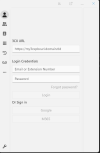
no!
when you start the windows 11 app
a blind user can hear 2 fields
1 for extension number
the other are a password field
not sure what the next thing is
so accessible for blind users a big no!
i dont remember how the android app are
 
no!
when you start the windows 11 app
a blind user can hear 2 fields
1 for extension number
the other are a password field
not sure what the next thing is
so accessible for blind users a big no!
i dont remember how the android app are
You're referring to the provisioning page?

1784790958749.png

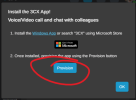
You could either have them use the PWA app or download the provisioning file for the 3CX desktop app. Either way, MicroSIP or 3CX Client needs provisioning first and MicroSIP requires manual set up which is a lot more difficult than the click to provision provided by 3CX.

Log in to your 3CX FQDN (Details on how to set up the client is provided in the welcome email extensions get - you could always resend it).

Click Apps > Windows App > Provision

1784791224918.png
 
  • Like
Reactions: Alejandro_3CX

Members Online Now

Forum statistics

Threads
111,832
Messages
589,278
Members
164,662
Latest member
DejanMDS