- Joined
- Jul 10, 2020
- Messages
- 6
- Reaction score
- 3
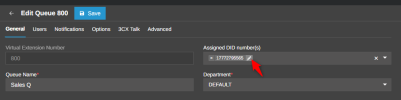
The DID Numbers page currently displays three columns: DID Number, Name, and Assigned To. The Name field appears to be read-only and remains blank for all DID numbers.
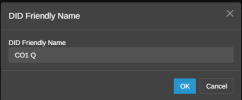
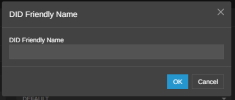
It would be highly beneficial if administrators could enter a custom name or note for each DID number. This would make it easier to identify and manage large lists of phone numbers directly within 3CX.
Many organizations maintain DID numbers across multiple geographic regions and use them for different purposes. The ability to add a descriptive label would significantly improve usability.
The Name field currently provides no way to store contextual information about a DID number. As a result, administrators must maintain separate spreadsheets or documentation to track how each number is used.
Examples include:
This small enhancement would provide significant value for administrators managing larger DID inventories.
It would be highly beneficial if administrators could enter a custom name or note for each DID number. This would make it easier to identify and manage large lists of phone numbers directly within 3CX.
Many organizations maintain DID numbers across multiple geographic regions and use them for different purposes. The ability to add a descriptive label would significantly improve usability.
The Name field currently provides no way to store contextual information about a DID number. As a result, administrators must maintain separate spreadsheets or documentation to track how each number is used.
Examples include:
- Kelowna | Personal DID
- Kelowna | Main Company Line
- Vancouver | Sales Line
- Vancouver | Emergency Line
This small enhancement would provide significant value for administrators managing larger DID inventories.