Hello
@Colorado VoIP
Yes, it is possible to migrate a system to a 3CX FQDN. Kindly note that this requires deploying a new instance, as the FQDN is selected during the deployment process and cannot be modified afterwards.
To proceed, you will first need to create a backup of your system without including the FQDN and License Key information. This will allow you to restore it to the new deployment once it has been created. For more information, please refer to our '3CX Backup & Restore Commands' document:
https://www.3cx.com/docs/backup-restore-command-line/
Once the backup has been created, you will need to release the current FQDN association from the license before creating the new deployment. To do so:
1. Log in to the 3CX Customer Portal using the assigned email for this key and navigate to 'My Systems'. Select the desired instance and click on 'Manage'.
2. Under your product's information, find the Install Status and FQDN. As this is a self hosted deployment, first turn off the host machine for this PBX. Once the PBX is stopped, refresh the license key information page, and you will find the 'Disconnect' option at the end of the FQDN entry.
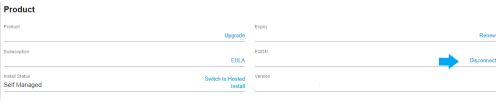
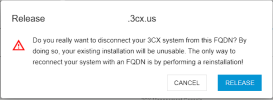
3. Click on 'Disconnect', and you will receive the 'FQDN release warning'. Click on 'Release' to disconnect your system from the current FQDN.
Once this is completed, you can deploy a new system using the same license key and select a 3CX FQDN during the deployment process.
After the new deployment has been completed, configure the backup storage location under Admin > System > Storage so the system can access the previously created backup. Then navigate to Admin > Backup, select the backup, and click Restore to recover your previous configuration. This is required since you cannot restore a backup without FQDN and License Key information.