Split DNS - Draytek

lusky

Bronze Partner
Basic Certified
Joined
Jul 21, 2019
Messages
16
Reaction score
2
3CX hosted locally and when I use a browser on the machine which 3CX is installed and add the FQDN into the search bar, I can access the admin page. However, if I go to another machine on the same same network, the page will not load.

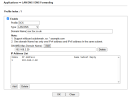
I have a Draytek 2860 router and have the following set up, but this will still not work. 192.168.2.20 is the local address where 3CX is installed.

What do I need to change to make this work, please?
 
3CX hosted locally and when I use a browser on the machine which 3CX is installed and add the FQDN into the search bar, I can access the admin page. However, if I go to another machine on the same same network, the page will not load.

I have a Draytek 2860 router and have the following set up, but this will still not work. 192.168.2.20 is the local address where 3CX is installed.

What do I need to change to make this work, please?
1784986997869.png1784986997869.png
 
What do I need to change to make this work, please?
How is the 3CX FQDN (xxx.3cx.co.uk in your example) being resolved on the second PC?

Test this using nslookup xxx.3cx.co.uk . This should also reveal which DNS server is being used by that second PC. If it isn't the DrayTek router, then the Split DNS entry for the 3CX must also be configured on that DNS server so that it returns the same response: the 3CX's local IP address.

Note: I recently discovered with another 3CX partner (using a slightly different DrayTek router, a 2766) that the device doesn't support proper Split DNS. The device was running the latest firmware. Sometimes it returned the external IP address which shouldn't happen. Ultimately, it worked because the external IP (via Hairpin NAT) was routed back to the 3CX's internal IP address anyway.
 
Ofc it will resolve on the machine 3CX is hosted on, DNS lookup is done from the PCs host file first.

On your Draytek go to LAN > DNS and make sure your DNS servers arent set to your WAN providers, this is typical when using Draytek as your DHCP server.
 

Members Online Now

Forum statistics

Threads
111,831
Messages
589,277
Members
164,660
Latest member
RJenkinsROCK