V20 changing from Custom Domain to 3CX domain

Mark Drabble

Customer
Joined
Nov 13, 2017
Messages
27
Reaction score
6
Way back in V15 when we moved to 3CX, I set up as a custom domain and all works well as no external access was required.

Due to some hybrid working now taking place, I need to provision either softphones or laptop to work with 3CX remotely and therefore need Certificates

Am i correct in thinking using a 3cx domain will allow for the use for Lets Encrypt to automatically keep certs up to date?

If so, can someone let me know what the recommended procedure is from changing from an custom domain to a 3cx domain on a self hosted (Debian) installation.

Cheers
 
You will need to run a backup from the command line (SSH) with everything BUT license & FQDN.

Then, release the FQDN from the customer portal under the license.

Next, spin up your new Debian install using the 3CX ISO and use the INSTALL button in the customer portal to generate the setup file needed and select the new FQDN. Make sure to set the same extension length and related locale settings so that you can successfully restore the backup on top of the new install. You will also need to edit the file (download it first) if you need to change HTTP/HTTPS ports. By default, the file will be set to 80/443 respectively.

Once all that is ready, go to the setup wizard of the new machine, upload the setup file where requested and let it do its setup. After it's completed, you will need to manually upload your backup to the new machine (or, if you're using external storage, simply link it there), and then restore that backup.

It sounds complex but it just needs to be done properly and in the right order. I'd be happy to assist if you want, we've done it many times!
 
  • Like
Reactions: KyriacosS_3CX
Managed to find a couple of different sites with 3CX and CertBot.

Manage to get it to work with cloudflare and Certbot on my custom domain, so all good
:)
 
Manage to get it to work
I am aware that this doesn't necessarily align with the current 3CX strategy and that some 3CX partners may see it differently, but at the moment, we are running all productive 3CX instances for all our customers exclusively on-premises as 3CX ENT on Debian with their own FQDN.

There are shell scripts available in the forum that allow the renewal of certificates at the operating system level. No additional software is installed on the 3CX system (which is prohibited by 3CX). The certificate renewal takes place with suitable mechanisms externally, the certificates are copied to the 3CX operating system and - if necessary- activated in the running 3CX instance via a shell script.

This has been working for years in many 3CX. It is still supported and tolerated by 3CX and we are grateful for that *like* *thanx*
 
  • Like
Reactions: KyriacosS_3CX
Seems like the new Portal updates have remove the release FQDN option. What if now you would like to change the FQDN?
 
Seems like the new Portal updates have remove the release FQDN option. What if now you would like to change the FQDN?
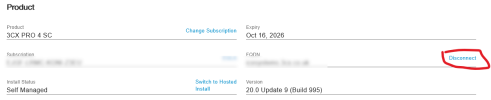
You can only release FQDN when signed in as license owner.
 
Currently am the owner. 1785399173284.png
 
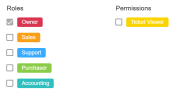
Those are the permissions for your partner portal.

your licenses must have unique email addresses associated with them.

then you can login to the customer portal and unlink.
 
  • Like
Reactions: Evolute IT
Then again, if you've been using the same email for the licenses as your partner portal login, you should see this.


1785400378528.png
 
  • Like
Reactions: Evolute IT
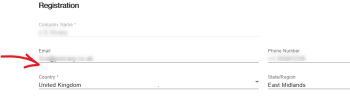
otherwise you need to login with this email

1785400496739.png
 
  • Like
Reactions: Evolute IT

Members Online Now

No members online now.

Forum statistics

Threads
111,831
Messages
589,277
Members
164,660
Latest member
RJenkinsROCK