google compute engine marketplace image broke?

Colorado VoIP

Gold Partner
Advanced Certified
Joined
Mar 10, 2014
Messages
312
Reaction score
223
hello!

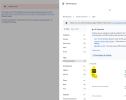
i was trying to setup a new 3cx instance in google compute engine and it seems the marketplace image is broken (possibly). when i select the 3cx option in the marketplace the error on the left (kinda shaded area) pops up and won't let you continue.
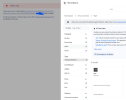
Screenshot 2026-07-30 131949.png

was just curious if anyone had reported this yet as I was going through the steps to change to a 3cx domain. ultimately i got our system back up and running using the non-supported manual install but I would like to do this right with the real marketplace image.

thanks!!
 
never mind. this looks to be a google problem. no marketplace image can be loaded. disregard!
 
Hi @Colorado VoIP,

I've just tested deploying a 3CX instance using the Google Marketplace image, and I wasn't able to reproduce the issue; the deployment completed successfully.

Does the issue still persist on your end?

If so, could you let us know exactly what happens? For instance, at which step the error appears, the exact error message (or a screenshot), and the region/project you're deploying to. That will help us investigate further.
 
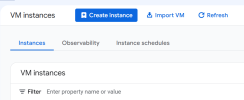
in the original post, i don't even get to the region. i click on create instance:
1785498249942.png


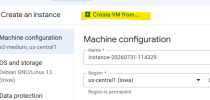
create vm from...
1785498277729.png

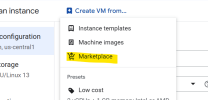
select marketplace:
1785498314033.png

search for 3cx and when clicking it, the error pops up:
1785498354687.png

feels like a google error more than anything, because you can't select any marketplace image from anything you search for.

unless maybe the steps to create a new system have changed and I missed that somehow?

thanks!!
 
  • Like
Reactions: AndreasY_3CX
Hi @Colorado VoIP,

Thank you for the information.

It appears that you're deploying your 3CX instance manually through Google Cloud Compute Engine by creating a VM instance. While this deployment method is possible and should work, we recommend deploying the instance directly from the Google Cloud Marketplace image, as this is the supported and recommended approach.

Could you please follow the guide below and let us know if the deployment is successful?

https://www.3cx.com/docs/pbx-google-cloud-marketplace/

Awaiting for your response.
 
Last edited:
  • Like
Reactions: Evolute IT
Hi @Colorado VoIP,

Thank you for the information.

It appears that you're deploying your 3CX instance manually through Google Cloud Compute Engine by creating a VM instance. While this deployment method is possible and should work, we recommend deploying the instance directly from the Google Cloud Marketplace image, as this is the supported and recommended approach.

Could you please follow the guide below and let us know if the deployment is successful?

https://www.3cx.com/docs/pbx-amazon-aws-marketplace/

Awaiting for your response.
Hi Andreas, i actually am trying to use the google market place image. it's when i click on the image that it pops up the error and doesn't let you continue.

super odd for sure.
 
  • Like
Reactions: AndreasY_3CX
Hi @Colorado VoIP,

Thank you for the clarification.

From the screenshot you provided, it appears that the deployment is being initiated from the Compute Engine > Create Instance page rather than directly from the Google Cloud Marketplace listing, which is why I wanted to confirm the deployment method.

If you are indeed launching it from the Marketplace and are still being redirected to that page with the error, could you please try clearing your browser cache or opening the Marketplace in an Incognito/Private browsing window and try again?
 
update, successfully used the install method on the 3cx portal and linked the google account. restored our backup and good to go.

not sure why loading the marketplace image directly from google would error out, but going right off the install.3cx.com worked perfect.
 
  • Like
Reactions: KyriacosS_3CX

Members Online Now

Forum statistics

Threads
111,831
Messages
589,277
Members
164,660
Latest member
RJenkinsROCK