Solved Error when setting up MCP and OpenAI

Status
Not open for further replies.

Alphabetic

3CX MVP
Silver Partner
Advanced Certified
Joined
Jul 1, 2016
Messages
6,537
Reaction score
2,565
Version 20.0 Update 10 (Build 1277 Alpha - AI 1.6.10)

Hi Guys

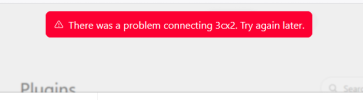
I attempted to use this plugin in OA and got an error saying it couldnt connected.

Deleted the plugin and MCP and attempted to set up again.

I get to the 3CX permission page in OA and I get this:

1786698646517.png


Where do I start to look?

thanks :)
 
Hi @Alphabetic as first step check the Firewall in front of the 3CX and ensure your 3CX HTTPS port is publicly accessible and not blocking incoming connections/IP ranges from OpenAI, also remove any GEO IP blocking and try it one more time.

If the error persist, then enable the verbose logging in the 3CX, start a packet capture in the 3CX, remove the failed app draft in OpenAI and create a new one from scratch using the full URL, follow the steps document here https://www.3cx.com/docs/connect-chatgpt-claude-mcp-server/ then check the 3cxai.log and the connection in the https port by firltering the capture.
 
  • Like
Reactions: Evolute IT
Hi @Alphabetic as first step check the Firewall in front of the 3CX and ensure your 3CX HTTPS port is publicly accessible and not blocking incoming connections/IP ranges from OpenAI, also remove any GEO IP blocking and try it one more time.

If the error persist, then enable the verbose logging in the 3CX, start a packet capture in the 3CX, remove the failed app draft in OpenAI and create a new one from scratch using the full URL, follow the steps document here https://www.3cx.com/docs/connect-chatgpt-claude-mcp-server/ then check the 3cxai.log and the connection in the https port by firltering the capture.
thanks.

I just restarted the server and it allowed me to connect.
 
Status
Not open for further replies.

Latest Posts

Members Online Now

Forum statistics

Threads
111,852
Messages
589,387
Members
164,691
Latest member
Daz1964