Error when setting up MCP and OpenAI

Alphabetic

3CX MVP
Silver Partner
Advanced Certified
Joined
Jul 1, 2016
Messages
6,533
Reaction score
2,558
Version 20.0 Update 10 (Build 1277 Alpha - AI 1.6.10)

Hi Guys

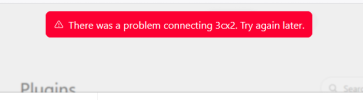
I attempted to use this plugin in OA and got an error saying it couldnt connected.

Deleted the plugin and MCP and attempted to set up again.

I get to the 3CX permission page in OA and I get this:

1786698646517.png


Where do I start to look?

thanks :)
 
Hi @Alphabetic as first step check the Firewall in front of the 3CX and ensure your 3CX HTTPS port is publicly accessible and not blocking incoming connections/IP ranges from OpenAI, also remove any GEO IP blocking and try it one more time.

If the error persist, then enable the verbose logging in the 3CX, start a packet capture in the 3CX, remove the failed app draft in OpenAI and create a new one from scratch using the full URL, follow the steps document here https://www.3cx.com/docs/connect-chatgpt-claude-mcp-server/ then check the 3cxai.log and the connection in the https port by firltering the capture.
 
  • Like
Reactions: Evolute IT
Hi @Alphabetic as first step check the Firewall in front of the 3CX and ensure your 3CX HTTPS port is publicly accessible and not blocking incoming connections/IP ranges from OpenAI, also remove any GEO IP blocking and try it one more time.

If the error persist, then enable the verbose logging in the 3CX, start a packet capture in the 3CX, remove the failed app draft in OpenAI and create a new one from scratch using the full URL, follow the steps document here https://www.3cx.com/docs/connect-chatgpt-claude-mcp-server/ then check the 3cxai.log and the connection in the https port by firltering the capture.
thanks.

I just restarted the server and it allowed me to connect.
 
  • Like
Reactions: Alejandro_3CX