Solved 12 hour / 24 hour setting

Status
Not open for further replies.

aberry

Premier Customer
Intermediate Cert.
Joined
Jan 13, 2015
Messages
146
Reaction score
13
We're running Snom D765 / D715 phones here. After the latest update we can now set the time display mode to 12 / 24 hour from the 3CX provisioning tab for the D765s. The D715s don't have that option. Seems this should be added for the phone or I'm going to have to ignore that setting completely and set everyone to 12 hour by changing the template. Can this be fixed officially?

Thanks
 
Hello @aberry

Please do inform me, are you using the default templates?

Thank you
 
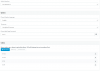
Yes, using the default template (Snom template version 68852). When I go into provisioning on the D715 phones I only have options for timezone and display language. It seems that some of the other settings such as Date Format, Time Format, would be very easy to enable setting from the GUI.
 
Hello @abbery

What is the version of your PBX? Can you please send me a screenshot of the Phone provisionin tab where the Time Format filed should have been displayed?
 
Running version 15.5.3849.1

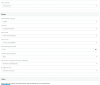
Attaching screenshots from both phone models.

As you can see there are many more options on the D765, which is a more capable device. It would seem though that settings such as date format and time format should be available on both devices. I would expect that the others such as ring, LED notifications, and backlight should be universal as well after looking at the SNOM documentation.
 

Attachments

  • D715 Options.PNG
    D715 Options.PNG
    43.5 KB · Views: 38
  • D765 Options.PNG
    D765 Options.PNG
    58.9 KB · Views: 35
Hello @aberry,

Unfortunately i can 't replicate your issue. When i'm adding the phone, all the appropriate fields are displayed including Time Format. Can you please create a new extension for the D715 phone and see if the issue persists? When adding the phone, under choose from available options select Snom 715/D715. Also please do all the pending updates if any.

Thank you
 
Also try clearing your browsers cache or open the management console from an incognito tab to make sure that this is not a display issue
 
Thanks for the tip. Browser cache and incognito didn't make any difference. I did have a copy of the template that I had played with setting some custom settings with. It wasn't selected, but deleting the second SNOM template resolved the issue, now all options are showing when I enter my extensions.

Thanks!
 
hi aberry,

Glad to hear the issue is resolved and thanks for sharing the solution ;)
 
Status
Not open for further replies.

Forum statistics

Threads
111,875
Messages
589,515
Members
164,724
Latest member
StratisFear