365 Integration

Status
Not open for further replies.

Alphabetic

3CX MVP
Silver Partner
Advanced Certified
Joined
Jul 1, 2016
Messages
6,682
Reaction score
2,669
Hey!

I've just set up the 365 integration in our 3CX for the sake of testing.

is there any way to force the contact sync?

How quick should the calendar/status sync happen?

my email in 3CX wasnt my username in 365 so i've just changed that in 3CX.

update: status sync now working since changing email, and also my personal contacts have synced.

post resolved.
 
Last edited:
Contacts will sync at night just like users, but real-time you can test it by adding a contact to your Outlook and it should appear in the 3CX Contacts shortly after.

As for calendar, that's a real-time one.
 
The documentation states an E3, E5 or 365 basic, std, premium required.

Does this integration not work with Exchange Online plans?
 
The documentation states an E3, E5 or 365 basic, std, premium required.

Does this integration not work with Exchange Online plans?
Exchange Online is just a Hosted Exchange, not an Office 365. It is not backed by a Azure AD. So, no.

E1 to E5, Business Basic and Business Standard are the only one that work.
 
Exchange Online is just a Hosted Exchange, not an Office 365. It is not backed by a Azure AD. So, no.

E1 to E5, Business Basic and Business Standard are the only one that work.
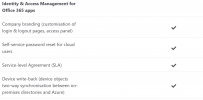
All users in Office 365 use Azure AD so it must be a feature of Azure AD that the EOP doesnt have that the others use, probably one of these.

1610717426458.png
 
All users in Office 365 use Azure AD so it must be a feature of Azure AD that the EOP doesnt have that the others use.
EOP is NOT Office 365. It's a different service that just uses Exchange only.

Thus, it will not work. However, you can try the Exchange integration for contacts and see if that works.
 
Office 365 is an umbrella for all the services that comes with it and all services of Office 365 use the same Azure AD. What features of Azure AD are used is determined by the license
 
Office 365 is an umbrella for all the services that comes with it and all services of Office 365 use the same Azure AD. What features of Azure AD are used is determined by the license
I am aware, but when using Exchange Online, you are not powered by a Azure AD in the backend, or at least not one you have control over.

Anyway, it won't work. That's it.
 
All 365 services use Azure AD, and I can indeed administer users via the Azure Active Directory portal.
 
So for curiosity sake I've set up 365 with an EOP1 account and both calendar and contact sync works. So, I wonder if maybe there's another part of it that doesnt work or that 3CX didnt want to list all 365 licenses that it can work with. I wonder if this integration will work as long as the account has licensed mailbox...

Needed to know as Im going to approach my 3CX customers to get this set up and not all have Microsoft 365 licenses
 
Status
Not open for further replies.

Latest Posts

Forum statistics

Threads
112,324
Messages
591,897
Members
165,475
Latest member
lastshadow