3CX “LIVE CHAT” show up on “Busy Hour” or “Weekend” or “National Holiday” Mode

Status
Not open for further replies.

eangney

Free User
Joined
Jun 13, 2021
Messages
11
Reaction score
2
Dear Experts, All,

Does 3CX have a feature for “LIVE CHAT” like when on “Busy Hour” or “Weekend” or “National Holiday” there will option to leave or show/telling that Company/staff is busy or might late in reply or weekend or national holiday mode?
 
Hi @eangney,

If you're using the 3CX version of Live Chat (linked to your PBX) then by having the Office Hours set, would log agents out of the queue by default (switching their profile to DND - though you can confirm this in the Extension >> Forwarding Rules >> DND >> Log out from queues).

This means that the agents would not be online to receive the chats and on the Live Chat side, you can enable Offline Messages so when a chat is started, a message will be returned mentioning whatever you'd like it to.
 
  • Like
Reactions: eangney
Hi, you mean the user has to switch status to DND manually?
And then, if no agent is in the queue, the chat offline message appears.
 
Hi @günther_e,

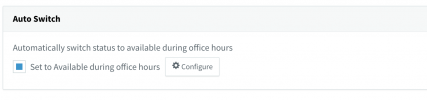
No, the status can switch by setting hours on the PBX itself as found in Management Console >> Settings >> Timezone, Office Hours & Holidays. When the PBX switches to out of office hours, the extensions will be changed to DND and logged out from the queue (if you've followed the information I posted in my previous response).

1627298139904.png

And then yes, the offline message will appear!
 
I understand.
So the following setting will switch the status to DND.

We have some special case here. ;-)
1627299125752.png
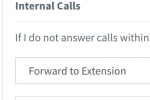
If the extension is set to DND if have to configure "Forward Internals Calls" to the extension Number to ensure that the user is avaliable for internal calls. Am I right?
1627300242769.png
 
Hi @günther_e,

If the extension is set to DND if have to configure "Forward Internals Calls" to the extension Number to ensure that the user is avaliable for internal calls. Am I right?
No, you can try this and what will happen if the extension is DND, it will not work.

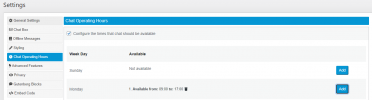
The best thing to do if you're wanting ONLY the Live Chat to not take chats during hours but you need extensions to take calls (internal or external), would be to set the operating hours in the Live Chat plugin itself:

1627300792427.png

The idea to set hours on the PBX is if you have regular hours you don't want agents to take calls (say after hours and during break times).

If I've misunderstood your use case, please feel free to tell me exactly what you're wanting as an outcome.
 
Oh well... that is exaclty what we need.
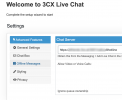
Is "chat operating hours" only avaliable in the WordPress plugin?

I can see only this options in the webconfiguration:

1627302770756.png
 
Last edited by a moderator:
Hi @günther_e,

Let's clear up some things to avoid any confusion.
  1. Where did you install the live chat plugin to?
  2. Is that a Wordpress site?
  3. What version is the plugin?
  4. How did you install the plugin?
Is "chat operating hours" only avaliable in the WordPress plugin?
Yes, you'll need that specific plugin.
 
Hi,
we are running a 3CX on premise installation. On our webserver we use the callus.js generated from your site.

So I because we have no Worpress site I am sorry I can't give you the Information about the plugin version ;-)
 
Hi @günther_e,

Unfortunately the option to set hours is specific to the Wordpress plugin version.
 
bad luck :-(

Is there a plan to bring that amazing feature to the non WP version?
 
Aha ... you write the WP plugin is also avaliable for Joomla... thats good news. Our Site runs with Joomly.
I never thought that a WordPress plugin is avaliable for Joomla ;-)
So - due to the heat in Austria - can you help me once more and tell my where I can find the Joomla plugin?
 
Hi @günther_e,

Yes you can go ahead and download the plugin.
 
Thank you very much. So I think my question has been answered although I've hijacked the chat from @eangney. :-\
 
No problem @günther_e. If you require any more assistance feel free to open a new thread.
 
Hi @günther_e

I'd like to point out that there may have been a misunderstanding here, that yes there is a plugin for Joomla and Drupal, but the functionality that was being discussed originally (Office Hours), isn't available.
The Joomla/Drupal plugins have the same features that the Code Generator have.
 
Status
Not open for further replies.

Forum statistics

Threads
112,149
Messages
590,965
Members
165,171
Latest member
Mahlon