3CX 16.0.4 Still Fails Firewall Test

Status
Not open for further replies.

Frank86

Bronze Partner
Joined
Jan 18, 2018
Messages
300
Reaction score
26
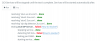
The same 3CX setup that passed the firewall test under 3CX 15.x still fails under 16.0.4 (SIP ALG).

Mildly annoying.
 
Dunno what to tell you. My installs pass the test. What firewall device are you using?
 
Most likely this will be the audio port increase causing this.

It was 9000 - 9500 and was increased to 10999, this will cause the failure if you have not up'd the ports on the firewall rule.

https://www.3cx.com/docs/ports/
 
...and are there ports that are failing? Do you have issues with calls not working properly?
 
Ports are open to 10999. The only thing that fails is SIP ALG. The firewall is a Meraki and the firewall rules are set up exactly as they were under 3CX 15.x, when the firewall test passed just fine.

The phone system works well (other than the occasional bad quality call—we use Flowroute over our data fiber circuit).
 

Attachments

  • Screen Shot 2020-01-01 at 9.39.36 AM.png
    Screen Shot 2020-01-01 at 9.39.36 AM.png
    46.8 KB · Views: 11
I didn't think Meraki even had ALG functionality.
Perhaps you can do a packet capture on the 3cx server or something during the Firewall test - this might give more information.
 
Meraki does not have ALG; that's why I never had a problem with 3CX vs 15.5 and always passed the test. It's only after upgrading to version 16 that I saw the error. I'll run a packet capture during a test and see what I find. Thank you.
 
Perhaps the test changed a bit since v15 - and looks for ALG before it can determine if it's active or not. So a false positive.
Wishful thinking...;)
 
So the ALG detection algorithm definitely changes over time. Also, I believe 3CX moved their test servers to AWS. On one customer install we had a conflicting port forward range for some AWS services that breaks some of the UDP ports for the firewall checker. At the end of the day the firewall checker is just a tool. It doesn't need to pass for a system to work, but if you have audio/network related issues then it's a good first step to troubleshoot. In your case it doesn't sound like it's causing a problem, as your audio quality issue is not a firewall symptom. About the only way a firewall would cause audio quality issues if it was dropping packets to due to some sort of rate limiting or CPU constraint (or crappy network stack).
 
Hello @Frank86

From your screenshot it looks like the test for ALG failed not that ALG was detected. Try running it again and see if that makes any difference.
 
Status
Not open for further replies.

Forum statistics

Threads
111,935
Messages
589,823
Members
164,816
Latest member
natedog