3CX 16, SIP trunk fail to register

Status
Not open for further replies.

tobiastromm

Free User
Joined
Jun 26, 2010
Messages
149
Reaction score
1
Hi.

I am having some issue with SIP TRUNK registration.

I am using IP to register my SIP TRUNK, but, every time my ISP changes my IP address I cant register until turn off and on my isp router.

Until do that, I receive the following message:

Registration at Voipmundo has failed.
Destination (sip:[email protected]:5060) is not reachable, DNS error resolving FQDN, or service is not available.

Please note that I am using IP, not DNS. There is no DNS issue on my network.

I try to Google these problem, find a lot of users, but no apply to my case.

How can I debug that to find the problem.

Thank You.
 
Change the dns settings on the 3cx to use google 8.8.8.8 and 8.8.4.4 - this appears to fix most dns issues
 
Yep, already using it.

And please note that I am using server ip, not fqdn.

Still dont know the problem here.
 
Hello @tobiastromm

Probably your router is caching your public IP and using that in the SIP messages. Once you restart it, it clears the cache and uses the correct one.
 
Check your IP blacklist and make sure that the new IP is whitelisted.
 
I would ask your ISP for a static IP address.
 
@YiannisH_3CX
And there is a way to fix that? Force something on 3CX maybe? (Maybe one of these options?

*Put Public IP in SIP VIA Header
*Force Invites to be sent to IP of Registrar
*Select which IP to use in 'Contact' (SIP) and 'Connection'(SDP) fields)


@bkreeger
There is nothing on IP Blacklist.

@Lee Cramman
I am a home user, and a static IP is not so cheap $$ here in Brazil.
 
It may be that your router is not picking up: the new IP until re-booted. If you log into the router when this happens, check the WAN settings, make note of the public IP that the router thinks it has. Then do a DHCP release and renew (or re-boot), is the IP different? Is it different each time you do that (some provider issue a new IP every time the router, or device re-boots).

There may be a router issue. Personally, I have a digital timer do a one minute re-boot in the middle of the night. Most times this does not mean a new public IP. I only seem to get one when the ISP does service on their equipment every 6 to 8 months, or so.

What make/model router are you using? Perhaps other have experienced the same issues?
 
Personally, I have a digital timer do a one minute re-boot in the middle of the night.

Some home routers have a scheduled reboot function built in that can simply be enabled via the web management page.

In terms of the OP's original problem I did wonder if this could be caused by an internal DHCP / port forwarding issue that resolves on reboot (i.e. PBX is on a dynamic IP with mapped ports which some domestic routers offer but the implementation is often buggy / unreliable). For this reason I think it's worth checking that the PBX is on a fixed internal IP.

I was also wondering what kind of authentication VOIPMundo use (i.e. is it purely username / password or is there an element of origin IP).

I think a good diagnostic test would be a ping or tracert of the IP address for VOIPMundo before and after the problem occurs. This would diagnose whether this is truly a connectivity problem or if the issue may lie somewhere else.
 
Hi @leejor, what a long time I don't talk to you.

My ISP provider use the router from Pace V5471-002. They change the original firmware and build their own.

Every time the router is rebooted they assign a new IP, and also they force [because they are crazy] a new IP after 48 hours of connection [I already try even talk to ANATEL, but here in Brazil things are very complicated].

The modem recognize the new IP as soon as the ISP provider force the IP renew, and it is show on the web interface of the router, as you can see:

10180

There is no option to restart the modem on scheduled time.

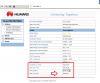
I am testing with some old router that I have here [Huawei SmartAX MT880a], I just need to wait and check what will happen with that model on the next time my ISP force the IP renew [I change it in the weekend, so I just need to wait more + - 6 hours to complete the 48 hours]. Then I will know if the problem is the router or maybe 3CX\VoIPmundo.
 
@Lee Cramman

yes, I am using a fixed internal IP on the 3CX Server, the router has an DMZ rule to this server IP.

On 3CX Server I am using Type of Authentication: Register/Account based.
 
I don't recommend putting PBX systems in DMZ. In my opinion it's better to use port forwarding.
 
  • Like
Reactions: Lee Cramman
If you are lucky enough to be using a separate modem and router, then swapping out the router is going to be a lot easier. If you are looking to do some testing with a very inexpensive model , look for a used D-LINK DIR-615, then flash it with DD-WRT firmware (check the version as not all are supported). Because they don't support wireless N, people have dumped them. Just turn off the wireless and use a newer Access point. The DD-WRT firmware gives you a lot of business options including PPTP VPN, and there's no cost. Not something I'd recommend for a business, but for home use, they're great
 
@Lee Cramman

yes, I am using a fixed internal IP on the 3CX Server, the router has an DMZ rule to this server IP.

On 3CX Server I am using Type of Authentication: Register/Account based.

It is looking more and more like a router / modem issue.

As @leejor suggested earlier, a timer running on the router to 'repair' the problem with a reboot each night sounds like an idea worth trying. Troubleshooting as you are by trying another router is a good plan though.

As @Trestill said, I wouldn't personally use DMZ and prefer port forwarding - that might be worth trying. The DMZ should work but I simply don't trust ISP supplied routers to work as expected.

edit: I just noticed the only thing you have plugged into your router's LAN ports is an Archer C20 which is also a router. Just to check that your PBX is plugged into the Power Box router and NOT the Archer or else you will have double NAT issues.
 
Last edited:
No problem this time!

The problem is really the adsl router.


10198

After the ISP provider force the new IP as you can see the VoIP SIP Trunk is registered successfully.

10199

10200

Now the big problem is to convince my ISP provider to fix they firmware from the other adsl modem.
 
@leejor
I can't use DD-WRT here, but I use it on my remote house on the beach, to connect to this house by PPTP VPN. I know well DD-WRT and already have some suggestions accepted by the firmware developer : - ).

@Trestill
I agree, but my adsl router don't have a option to redirect PPTP ports with GRE, and I need it, so the only way to make it working is to open all with DMZ.

@Lee Cramman
I dont have an archer C20. I just copy that image from internet, since I was using the old modem for test and dont have access to the web interface the time I write here.
 
Status
Not open for further replies.

Latest Posts

Forum statistics

Threads
111,920
Messages
589,741
Members
164,794
Latest member
avmullins