Solved 3cx 16 to 18 Upgrade Borked.

Status
Not open for further replies.

ChrisAtPentasys

Bronze Partner
Intermediate Cert.
Joined
Aug 10, 2021
Messages
17
Reaction score
2
Clicked on the update, waited 20 mins. Nothing. Looked at Google Cloud console: CPU = .33% after a short increase around the time I pressed the upgrade button; logs for the machine don't seem to indicate any error. Tried from multiple browsers to reconnect and only get the error below. Can't SSH into the instance. Have reset the VM. I'm now at a loss... Restored from backup into a new instance.

Thoughts?
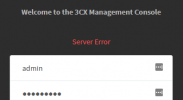
1628622778461.png
 
You should follow the thread I just opened, I have the exact same problem but i've not hit the nuke button yet.

Did you install this server from an ISO or did you manually install 3CX?
 
You should follow the thread I just opened, I have the exact same problem but i've not hit the nuke button yet.

Did you install this server from an ISO or did you manually install 3CX?
I will follow. Thanks. I saw someone else had the same error but he decided to pursue a restore for now. We are not alone!

Mine is a Google Cloud VM and was created a few years ago with the PBX Express. You can't really do ISO installs with Google Cloud.

What really gets me is I can't even SSH to the old VM anymore. Something is really messed up.

  • 3CX Version, e.g. Standard Annual 16.0.8.9
  • Server OS, e.g. Debian 9
  • Is the 3CX Server Hosted and where? GCP
  • IP Phone Make/Model/Firmware Fanvil X5S
  • Provisioning Method: STUN & SBC
  • Trunk Provider or Gateway Make/Model SIPTrunk.com
  • Has the Firewall Checker passed: YES
  • Are custom Phone Templates being used: NO
 
I am having a similar issue now on a VM in VMWare. I can still SSH though. 3CX is bricked though I think.
 
@ChrisAtPentasys

Sorry bout this but it's unclear to me what the current situation is:

Can't SSH into the instance. Have reset the VM
Restarting the VM from Google's Console still does not allow you to SSH? Are you trying to SSH via Google's Console directly?

I'm now at a loss... Restored from backup into a new instance.
Did you redeploy a Debian 9 3CX v16 instance to get the PBX up and running again? Is that now working?


If yes, what happened with the previous instance, is it still showing the "Server Error" message with no SSH
access?
 
@ChrisAtPentasys

Sorry bout this but it's unclear to me what the current situation is:


Restarting the VM from Google's Console still does not allow you to SSH? Are you trying to SSH via Google's Console directly?


Did you redeploy a Debian 9 3CX v16 instance to get the PBX up and running again? Is that now working?


If yes, what happened with the previous instance, is it still showing the "Server Error" message with no SSH
access?
Correct. Something really bad happened and the Console now hangs in a loop trying to transfer the keys from the project to the instance. Rebooting does not help. I can SSH to the external IP address but I don't have the private keys saved on my PC to use in Putty. I did not receive an email about the failure.

I created a new instance from the marketplace and restored from backup. If any of your gurus have any key export methods, I'm happy to assist getting back into that instance so you can review logs. The old VM is turned off right now but if I turn it back on and connect to the IP address (FQDN is reassigned) "Server Error" is displayed.

In @kieferschild megathread, I noted that I tried the update again in the new VM and it failed again but this time I made sure I had private keys and external access before starting and was able to recover via their posted steps. I did receive a failure email this time.
 
Correct. Something really bad happened and the Console now hangs in a loop trying to transfer the keys from the project to the instance. Rebooting does not help. I can SSH to the external IP address but I don't have the private keys saved on my PC to use in Putty. I did not receive an email about the failure.

I created a new instance from the marketplace and restored from backup. If any of your gurus have any key export methods, I'm happy to assist getting back into that instance so you can review logs. The old VM is turned off right now but if I turn it back on and connect to the IP address (FQDN is reassigned) "Server Error" is displayed.

In @kieferschild megathread, I noted that I tried the update again in the new VM and it failed again but this time I made sure I had private keys and external access before starting and was able to recover via their posted steps. I did receive a failure email this time.

Did you try upgrading again after recovering as mine went through fine after this.
 
@ChrisAtPentasys

I'll contact you via PM shortly for more information on the matter.
 
Did you try upgrading again after recovering as mine went through fine after this.
Yes, I did. That failed too but I got an email about the failure. I used the steps you posted about your support incident to recover.
 
@ChrisAtPentasys

our update logs (outlined here) showed for one IP related to one of your subscriptions, which is in google, that the 3CX repository is in an unmatched state. In other words, it sees the repository from the 2nd of August but this is very old. The odd thing is, the CDN we use is also provided by Google...

In this case, APT (the Linux installer) skips the installation. In case you could gain access to the VM, which is an issue outside of the above.

We will add an additional check to prevent the unmatched stated, even I cannot explain myself why this can happen from google to google, but that's a different story.

For the time being the following should get you up and running. (note: the following script will work only for this specific case - not to be used for any other failed upgrade)
Bash:
sed -i s/buster/stretch/g /etc/apt/sources.list
sed -i s/buster/stretch/g /etc/apt/sources.list.d/*
apt update
apt install 3cxpbx=16.0.8.9
 
@ChrisAtPentasys

our update logs (outlined here) showed for one IP related to one of your subscriptions, which is in google, that the 3CX repository is in an unmatched state. In other words, it sees the repository from the 2nd of August but this is very old. The odd thing is, the CDN we use is also provided by Google...

In this case, APT (the Linux installer) skips the installation. In case you could gain access to the VM, which is an issue outside of the above.

We will add an additional check to prevent the unmatched stated, even I cannot explain myself why this can happen from google to google, but that's a different story.

For the time being the following should get you up and running. (note: the following script will work only for this specific case - not to be used for any other failed upgrade)
Bash:
sed -i s/buster/stretch/g /etc/apt/sources.list
sed -i s/buster/stretch/g /etc/apt/sources.list.d/*
apt update
apt install 3cxpbx=16.0.8.9
The logs that were send via PM are for the second VM that I have access to. After I restored into the second VM and was back up on v16 I tried the update again. The update failed again, but now I have the log files. This second VM was created from the Google Cloud Marketplace and only have the restore applied by the initial setup—no other modifications were made. I've reviewed list of blocking modifications for the 3% of failed installs and haven't made any of those either. The first VM was created by PBX Express in 2018 and the only change to it was partition expansion.

Per the instructions posted by @kieferschild at "https://www.3cx.com/community/threads/upgrade-to-v18-failed-on-debian-hosted-vm-with-ovh.83324/" I was able to run those commands to successfully recover my failed upgrade back to v16.

What I think you're saying is that the Debian upgrade happened successfully, but when the 3cx v18 install kicked off the content at the CDN referenced in the 3cx repo file was out of date and the upgrade was halted. (So your instructions to change the repo file back to the v16 and install makes sense.)

When should I attempt to upgrade again? Will the files I manually changed (commented out) be changed back to the v18 versions by the installer?
 
Hi, I have the same problem, I have not format the VM yet....
 
Hi there,
What I think you're saying is that the Debian upgrade happened successfully, but when the 3cx v18 install kicked off the content at the CDN referenced in the 3cx repo file was out of date and the upgrade was halted. (So your instructions to change the repo file back to the v16 and install makes sense.)
No, Debian did not successfully upgrade to 10 (Buster).
When should I attempt to upgrade again? Will the files I manually changed (commented out) be changed back to the v18 versions by the installer?
You should revert the changes you made to the sources.list file. Remove the (manually)added repositories, uncomment the lines you commented out and replace "Buster" with "Stretch". Basically revert the file to its default state. Then run apt-get clean && apt-get update

You can then either try upgrading again or wait for our revised upgrade script which will detect and abort in case it detects hash mismatch while fetching the release file from the repo.
 
  • Like
Reactions: ChrisC_3CX
Hi there,

No, Debian did not successfully upgrade to 10 (Buster).

You should revert the changes you made to the sources.list file. Remove the (manually)added repositories, uncomment the lines you commented out and replace "Buster" with "Stretch". Basically revert the file to its default state. Then run apt-get clean && apt-get update

You can then either try upgrading again or wait for our revised upgrade script which will detect and abort in case it detects hash mismatch while fetching the release file from the repo.
I'm a little confused trying to reconcile the step in two posts. The changes made per support to get v16 back up and running in @kieferschild's post comment out Buster and replace with Stretch, as you are suggesting. Did the upgrade change the files to reference Buster to pull the new version? That would make sense and mean that the change I made from Buster to Stretch and your changes are same the destination.

Will there be a post or update about the updated script so I know when to try again?

There's also a suggestion to take a backup and install v18 from the Marketplace and restore from backup during 3cx setup. I really like this idea given I don't have to wait for the updated script and my current installation stays as is. But, v18 on Buster is not there yet?
 
Did the upgrade change the files to reference Buster to pull the new version?
Yes, the files were changed by the upgrade script.

Will there be a post or update about the updated script so I know when to try again?
Probably there will be some mention in the forum.


There's also a suggestion to take a backup and install v18 from the Marketplace and restore from backup during 3cx setup. I really like this idea given I don't have to wait for the updated script and my current installation stays as is. But, v18 on Buster is not there yet?
The marketplace images are currently V16 images. The reason why they are still V16 is because the process of updating the Marketplace images takes up to 3 weeks.
What you could do though is deploy a new VM via the marketplace and restore your backup (it will be V16), then try the upgrade again on the new VM.
 
Yes, the files were changed by the upgrade script.


Probably there will be some mention in the forum.


The marketplace images are currently V16 images. The reason why they are still V16 is because the process of updating the Marketplace images takes up to 3 weeks.
What you could do though is deploy a new VM via the marketplace and restore your backup (it will be V16), then try the upgrade again on the new VM.
Forgive me, but which forum so I can make sure I'm following? :-D

The VM instance I am using now is Marketplace v16 restored from backup because my original VM was borked so bad by the update script I couldn't get back in via SSH and fix it. After restoring, I tried doing the update in this new VM and it failed again b/c the CDN data wasn't correct. If there is a way I can manually confirm the CDN data my VM sees is correct, I'd be willing to try again.
 
Yes, the files were changed by the upgrade script.


Probably there will be some mention in the forum.


The marketplace images are currently V16 images. The reason why they are still V16 is because the process of updating the Marketplace images takes up to 3 weeks.
What you could do though is deploy a new VM via the marketplace and restore your backup (it will be V16), then try the upgrade again on the new VM.
Just wanted to follow up on this. Did the script get updated? Should I try again? :)
 
Just wanted to follow up on this. Did the script get updated? Should I try again? :)
We will be uploading a slightly revised script later today that should secure upgrades from failing even further in various edge-cases we've seen like yours.

I'd suggest you give it a try tomorrow after it's been uploaded.
Bear in mind that we can't replicate the exact scenario you are facing (you are one of a kind!) but based on our understanding of what is happening, we have tried to put measures in place where at least 3CX will roll back if something is amiss.
 
Status
Not open for further replies.

Forum statistics

Threads
111,980
Messages
590,106
Members
164,908
Latest member
FarizQasimov