- Joined
- Jan 5, 2021
- Messages
- 2
- Reaction score
- 2
Hi everyone,
I am trying to set-up a back-up secondary SBC on a Raspberry Pi 3 B+ for testing. Our RPI 4s are on order.
When i try to download the software from any of the links below:
wget http://downloads.3cx.com/downloads/sbc/3cxsbc.zip -O- | sudo bash
or
wget https://downloads-global.3cx.com/downloads/misc/d10pi.zip; sudo bash d10pi.zip
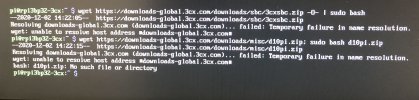
it give me the following error messages:
" --2020-12-02 13:42:43-- http://downloads.3cx.com/downloads/sbc/3cxsbc.zip
Resolving downloads-global.3cx.com (downloads-global.3cx.com)... failed: Temporary failure in name resolution.
wget: unable to resolve host address downloads-global.3cx.com
or
" --2020-12-02 13:42:43-- https://downloads-global.3cx.com/downloads/misc/d10pi.zip
Resolving downloads-global.3cx.com (downloads-global.3cx.com)... failed: Temporary failure in name resolution.
wget: unable to resolve host address downloads-global.3cx.com
bash: d10oi.zip: No such file or directory"
I tried this with 2 new 32GB Class Micros SD cards and 2 different versions of Raspbian OS Lite and i got the same results.
MicroSD #1 Debian 10.6 Buster
MicroSD #2 Debian 9.8 Stretch
can anyone point me to the right direction?
I am trying to set-up a back-up secondary SBC on a Raspberry Pi 3 B+ for testing. Our RPI 4s are on order.
When i try to download the software from any of the links below:
wget http://downloads.3cx.com/downloads/sbc/3cxsbc.zip -O- | sudo bash
or
wget https://downloads-global.3cx.com/downloads/misc/d10pi.zip; sudo bash d10pi.zip
it give me the following error messages:
" --2020-12-02 13:42:43-- http://downloads.3cx.com/downloads/sbc/3cxsbc.zip
Resolving downloads-global.3cx.com (downloads-global.3cx.com)... failed: Temporary failure in name resolution.
wget: unable to resolve host address downloads-global.3cx.com
or
" --2020-12-02 13:42:43-- https://downloads-global.3cx.com/downloads/misc/d10pi.zip
Resolving downloads-global.3cx.com (downloads-global.3cx.com)... failed: Temporary failure in name resolution.
wget: unable to resolve host address downloads-global.3cx.com
bash: d10oi.zip: No such file or directory"
I tried this with 2 new 32GB Class Micros SD cards and 2 different versions of Raspbian OS Lite and i got the same results.
MicroSD #1 Debian 10.6 Buster
MicroSD #2 Debian 9.8 Stretch
can anyone point me to the right direction?