3CX and Grandstream HT801

I once again opened the xml file in my browser and did a save as I then under upload configuration clicked on upload from local directory. I click on choose file and choose the correct xml file I just saved. I see the file name next to the choose file button. Under it I see the button to upload configuration so I click it. It says
The device is processing the firmware or configuration now...
You may relogin by clicking on the link below in 250 seconds.
Click to relogin
I wait 10 minutes and the login screen is actually back to log in and I log in to find no changes.
The SBC is green and I followed all instructions to create it. The Grandstream HT801 remains red.
 
Maybe you broke the xml file. Just right click an save as it is. You can also check if in the xml file the server adress is the ip address of your sbc.
 
Maybe you broke the xml file. Just right click an save as it is. You can also check if in the xml file the server adress is the ip address of your sbc.
Here is a video link to what and how I navigate. I will leave it published unlisted on youtube for a week. I would appreciate anyone that can help me get past this issue so I can play with VoIP and begin to understand it.
 
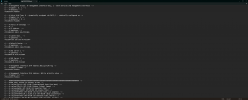
P22106>192.168.100.100</P22106>

<!-- # Subnet Mask. -->

<!-- # ipaddress -->

<P22107>255.255.255.0</P22107>

<!-- # Default Router. -->

<!-- # ipaddress -->

<P22108>192.168.100.1</P22108>

<!-- # DNS Server 1 -->

<!-- # ipaddress -->

<P22109>0.0.0.0</P22109>

<!-- # DNS Server 2 -->

<!-- # ipaddress -->

<P22110>0.0.0.0</P22110>

<!-- # Management Interface IPv4 Address:802.1Q/VLAN Tag -->

<!-- # Number: 0-4094 -->

<P22111>0</P22111>

<!-- # Management Interface IPv4 Address: 802.1p priority value -->

*********Is that the issue since locally my SBC is 192.168.1.69*****

<!-- # Number: 0-7 -->
 
I updated it from the one above

1735445167110.png
 
I have tried every IP in the various spots to try and get this to work and it is still red. I have no clue if I am missing something.
 
I created a python prog to get my HT801 V1 online and still nothing.

# HT801 V1 Configuration Generator (with SBC)

def get_input(prompt, default=None):
"""Get user input with optional default value"""
value = input(prompt)
return value if value else default

def main():
print("HT801 V1 Configuration Generator (with SBC)")

# Get SBC IP address
sbc_ip = get_input("Enter SBC IP address: ")

# Get 3CX server IP address
server_ip = get_input("Enter 3CX server IP address: ")

# Get HT801 V1 device IP address
device_ip = get_input("Enter HT801 V1 device IP address: ")

# Get extension number and authentication
extension_number = get_input("Enter extension number: ")
auth_id = get_input("Enter authentication ID: ")
auth_password = get_input("Enter authentication password: ")

# Get SBC SIP trunk settings
sip_trunk_name = get_input("Enter SBC SIP trunk name: ")
sip_trunk_auth_id = get_input("Enter SBC SIP trunk authentication ID: ")
sip_trunk_auth_password = get_input("Enter SBC SIP trunk authentication password: ")

# Generate configuration file
with open("ht801_config.txt", "w") as f:
f.write(f"SBC IP Address: {sbc_ip}\n")
f.write(f"3CX Server IP Address: {server_ip}\n")
f.write(f"HT801 V1 Device IP Address: {device_ip}\n")
f.write(f"Extension Number: {extension_number}\n")
f.write(f"Authentication ID: {auth_id}\n")
f.write(f"Authentication Password: {auth_password}\n")
f.write(f"SIP Trunk Name: {sip_trunk_name}\n")
f.write(f"SIP Trunk Authentication ID: {sip_trunk_auth_id}\n")
f.write(f"SIP Trunk Authentication Password: {sip_trunk_auth_password}\n")

print("Configuration file generated: ht801_config.txt")

if __name__ == "__main__":
main()
 
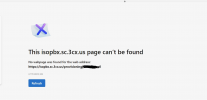
I am struggling with a similar issue but I can not get th xml to download so that I can upload to the Grandstream, any advile? This is all i get. 404 error. This is hosted with 3CX

1737222512473.png
 
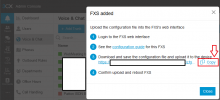
That means: if you specify the correct MAC of the ATA during the initial setup of the HT801, select provisioning via the (locally available, configured and functioning) SBC and see the following dialog, then you cannot download the configuration file offered via the link there?

1737331495193.png


The link with isopbx.sc.3cx.us in your screenshot looks strange. Are you sure that is the FQDN of 3CX?
 
I had similar problem and below is how I resolved it.
I read in Support Page that Grandstream Upgrade server uses HTTP protocol and and I noticed the paths for some devices are not the same. Also when the device is powered up it checks for latest firmware. The firmware path for ATAs eg HT801 is http://firmware.grandstream.com (see support page here: http://www.grandstream.com/support/firmware). However 3CX Provisioning link which you obtain from your Admin Console setup in Voice & Chat uses HTTPS protocol. So

(A) to get the latest firmware version, in HT801 web GUI Advanced Setting look for "Firmware Upgrade and Provisioning" section and do the followings:
1. in "Upgrade via", Select HTTP
2. in "Firmware Server Path": enter: "firmware.grandstream.com"
3. Scroll to the bottom of the page and click, Upgrade, Apply and Reboot
This should upgrade your firmware.

(B) To apply 3CX Provisioning link, again go to HT801 web GUI Advanced Setting look for "Firmware Upgrade and Provisioning" section and do the followings:
1. in "Upgrade via", Select HTTPS
2. in "Config Server Path": enter the 3CX provisioning link you obtain from 3CX's HT801 console.
3. Scroll to the bottom of the page and click, Upgrade, Apply and Reboot
This should Register your device.

What I then did was reset the Upgrade path to HTTP and then reboot the device so that it can obtain future firmware upgrades. The only problem here is any changes to 3CX configuration will not be updated on the device, so, keep record of the Web Console Password.
I hope this helps!
 
Last edited:

Members Online Now

Forum statistics

Threads
111,835
Messages
589,291
Members
164,668
Latest member
Infinity Network