3cx and Linksys spa 3102

Status
Not open for further replies.

Kidar

Joined
May 24, 2018
Messages
3
Reaction score
0
Hi, I need help in congiuring my SPA 3102 to act as a trunk and an extension. I have the latest 3cx pbx, but cannot get it working. My 3cx pbx is a hosted one. my other extensions are all working.
Thanks

Kidar
 
It will work. Do a Google search for "SPA3102 3CX". There have been many posts on this subject. If you are trying to set up remotely (hosted PBX), then you may run into some issues with the PSTN trunk.
Let me know how you are configuring, and if you end up pulling out your hair, post the PSTN tab.
 
Hi Leejor,
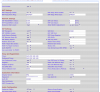
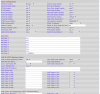
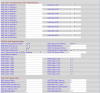
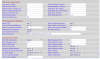
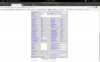
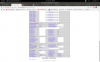
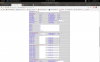
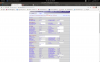
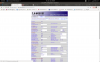
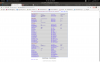
i have gone through many posts, can't get the extension or the pstn to work. I am more interested in the pst. Also the pbx is remotely hosted. Attached are the pstn tabs.
Thanks
 

Attachments

  • Screenshot from 2018-11-21 22-38-19.png
    Screenshot from 2018-11-21 22-38-19.png
    104.5 KB · Views: 39
  • Screenshot from 2018-11-21 22-39-47.png
    Screenshot from 2018-11-21 22-39-47.png
    106.6 KB · Views: 33
  • Screenshot from 2018-11-21 22-40-15.png
    Screenshot from 2018-11-21 22-40-15.png
    103.3 KB · Views: 28
  • Screenshot from 2018-11-21 22-40-37.png
    Screenshot from 2018-11-21 22-40-37.png
    84.6 KB · Views: 31
Well right off the bat, Dialplan 8 is incorrect. It should be (S0<:10000>) that's a zero after the S.
That said, is there some reason you are using local port 45060 rather than something like 5061 or 5062?

The fact that you are attempting to use this remotely to the server may present some issues (it is not officially supported). You should have assigned the 3102 a static IP. It will probably be required to have STUN enabled. I don't use Authorization ID, or the outbound proxy with a remotely registered 3102. You can set Register Expires to 1700 or 1800, it doesn't have to be as low as 300. Line 1 VoIP Caller Dialplan can be left at the default of "none"
The public IP that it is behind along with it's local port will have to be used in the 3CX trunk (10000) settings so that 3CX Can send call to the 3102. The local router at the 3102 end may need the SIP port forwarded. There are voice ports involved as well, but I would leave that until you can get call working both ways. I'm hoping that there re not other SIP devices behind the same router, that may cause "no-audio" issues. Given that you have set the FXO Impedance to "Global", I assume you are not located in North America.

That is about it for now. See if the 3102 shows as registered both at 3CX and the Info tab of the 3102, and post any 3CX Activity Log error messages you get when attempting calls.
 
Well right off the bat, Dialplan 8 is incorrect. It should be (S0<:10000>) that's a zero after the S.
That said, is there some reason you are using local port 45060 rather than something like 5061 or 5062?

The fact that you are attempting to use this remotely to the server may present some issues (it is not officially supported). You should have assigned the 3102 a static IP. It will probably be required to have STUN enabled. I don't use Authorization ID, or the outbound proxy with a remotely registered 3102. You can set Register Expires to 1700 or 1800, it doesn't have to be as low as 300. Line 1 VoIP Caller Dialplan can be left at the default of "none"
The public IP that it is behind along with it's local port will have to be used in the 3CX trunk (10000) settings so that 3CX Can send call to the 3102. The local router at the 3102 end may need the SIP port forwarded. There are voice ports involved as well, but I would leave that until you can get call working both ways. I'm hoping that there re not other SIP devices behind the same router, that may cause "no-audio" issues. Given that you have set the FXO Impedance to "Global", I assume you are not located in North America.

That is about it for now. See if the 3102 shows as registered both at 3CX and the Info tab of the 3102, and post any 3CX Activity Log error messages you get when attempting calls.
Hi,
When I did a local installation of the pbx and configured the spa3102 i had no problems.

My main pbx is hosted in the cloud. I have four sip phones that connect with no problems. However the SPA does not connect. From the Spa all i require is that the pstn line ring on the external pbx. The cloud pbx uses 45060 for sip port. On my side i have even put the spa in the dmz section of the router but still failed.
Also if it is possible to use the pstn line from any extension would be nice.
Hope you can help
 

Attachments

  • Screenshot from 2018-12-20 09-39-32.png
    Screenshot from 2018-12-20 09-39-32.png
    187.1 KB · Views: 31
  • Screenshot from 2018-12-20 09-39-22.png
    Screenshot from 2018-12-20 09-39-22.png
    174.3 KB · Views: 30
  • Screenshot from 2018-12-20 09-39-18.png
    Screenshot from 2018-12-20 09-39-18.png
    165 KB · Views: 27
  • Screenshot from 2018-12-20 09-39-10.png
    Screenshot from 2018-12-20 09-39-10.png
    192.8 KB · Views: 26
  • Screenshot from 2018-12-20 09-38-58.png
    Screenshot from 2018-12-20 09-38-58.png
    200.9 KB · Views: 24
  • Screenshot from 2018-12-20 09-38-41.png
    Screenshot from 2018-12-20 09-38-41.png
    170 KB · Views: 25
Getting a call from the PSTN, into 3Cx should be relatively easy with the 3102 behind a remote router. that said, the remote router may create some issues. Getting a call from 3CX back out on the PSTN line, may be more difficult.
Deal with the inbound PSTN first. And until that is working, be sure that the extension settings in the 3102 (Line 1) is disabled. And you may want to consider covering some of the more sensitive information from your screen shots. like the authentication id, server FQDN, etc.. things hackers can make use of.

Check the 3CX Activity Log for a registration attempt. Is there one? If so, why does it say it fails? What does the registration look like, does it show the public IP of the remote router and the local port (45060) that you assigned the PSTN portion?
 
Status
Not open for further replies.

Forum statistics

Threads
111,906
Messages
589,667
Members
164,771
Latest member
mjwhyman